How to Calculate Your Google Ads Budget: Formula, Examples and ROAS

Performance Marketing & Google Ads
How to Calculate Your Google Ads Budget: A Practical Guide to Avoid Wasting Money
How much should you invest in Google Ads? It is the question every company asks before getting started, and the one that almost nobody answers accurately.
This guide explains how to calculate your budget based on business objectives rather than arbitrary figures or gut feelings.

In Brief
To calculate a Google Ads budget, you must start from your business objective, not from an arbitrary amount.
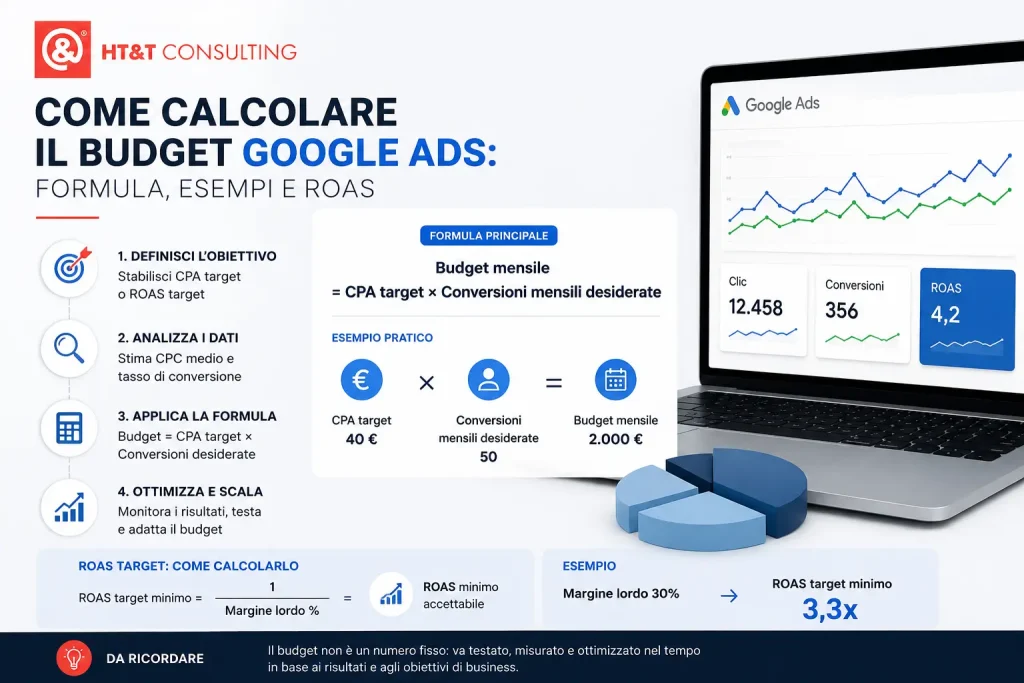
The basic formula is: monthly budget = target CPA × desired monthly conversions.
To determine whether the budget is realistic, first estimate the expected CPA: estimated CPA = average CPC / website conversion rate.
If the estimated CPA is higher than your margin or the sustainable value of a lead, the issue is not the budget: it is the margin, the CPC, the landing page or the conversion rate.
Google Ads Budget: Quick Calculation Method
| Data Required | Why It Matters |
|---|---|
| Target CPA | Defines how much you can spend to acquire a sale or a lead |
| Desired Conversions | Transforms your commercial objective into a monthly budget |
| Average CPC | Allows you to estimate the cost of acquiring qualified traffic |
| Conversion Rate | Determines the actual CPA generated by purchased traffic |
Google Ads: The Numbers You Should Know Before Defining a Budget
Why Are Most Google Ads Budgets Wrong?
There are two common ways companies define a Google Ads budget.
The first is choosing a figure that “sounds reasonable” (€500, €1,000, €2,000 per month) without any supporting calculation. The second is copying what a competitor does, who probably used the first method as well.
Tip: Because of cookie restrictions and Consent Mode, keep in mind that Google may fail to track 15–20% of actual conversions. When calculating your budget, take this “dark funnel” into account so you do not pause campaigns that are actually profitable.
Both approaches lead to the same outcome: an arbitrary budget with no connection to business objectives, actual click costs in the target market, or the available volume of demand.
The correct budget calculation starts from the business objective (how many sales or leads you want to generate) and works backwards through website conversion rate and average industry CPC. It is not a complex process, but it requires baseline data that many companies either do not have or do not know how to obtain.
The question for a sustainable investment is not “how much can I spend on Google Ads” but “how much does it cost me to acquire a customer and how many customers do I want to acquire each month”.
From there, the budget is calculated, not decided.
What Is the Formula for Calculating a Google Ads Budget?
The starting point is a simple formula that connects budget, objectives and performance:
Basic Formula
Monthly Budget = Target CPA × Desired Monthly Conversions
Where target CPA = average order value (or lead value) × acceptable acquisition margin
This formula alone is not enough; it requires an intermediate step to verify whether the calculated budget is sufficient to purchase enough clicks in the target market. Here is the complete three-step formula:
Complete Formula — 3 Steps
1. Estimated average CPC × (1 / conversion rate) = Estimated CPA
2. Estimated CPA vs Target CPA → sustainability check
3. Target CPA × desired conversions = monthly budget
Practical Example — Fashion Ecommerce
Estimated average CPC in the industry: €0.80 · Website conversion rate: 2% ·
Estimated CPA: €0.80 / 0.02 = €40 per sale ·
Average order value: €120 · Gross margin: 40% → margin per order €48 ·
Acceptable target CPA: €40 (below margin) ✓ ·
Goal: 50 sales per month ·
Monthly budget: €40 × 50 = €2,000
If the estimated CPA exceeds the margin per order, the calculated budget is not sustainable. This means that either the conversion rate is too low, or the industry’s average CPC is too high relative to the product’s average order value. In that case, you need to improve the landing page, campaign structure or keyword selection before investing a significant budget.
Before the Budget: How Reliable Are Your Conversion Data?
Google Ads budget calculation depends on the quality of the available data.
If conversion tracking is incomplete, the actual CPA may differ from what is shown in the platform, and budget decisions may therefore be incorrect.
For this reason, before increasing or reducing investment, it is necessary to verify that GA4, Google Ads, Consent Mode, conversion tags and ecommerce tracking are configured correctly.
In more advanced projects, server-side tracking helps make measurement more stable and consistent with the limitations introduced by browsers, consent requirements and ad blockers.
In practice: a budget should not be evaluated solely based on the ROAS visible in Google Ads, but on the consistency between advertising data, actual orders, CRM data, margins and analytics.
How Do You Define a Target CPA and a Target ROAS?
Target CPA (cost per acquisition) and target ROAS (return on ad spend) are the two fundamental parameters on which budget calculation and bidding strategy decisions are based.
Target CPA for Ecommerce
For ecommerce, the correct metric is the target ROAS, meaning the ratio between generated revenue and advertising spend.
A ROAS of 4 means that for every euro spent on advertising, four euros in revenue are generated.
Minimum Acceptable Target ROAS
Minimum ROAS = 1 / gross margin %
Example: gross margin 30% → minimum ROAS = 1 / 0.30 = 3.3× (below this value, campaigns cost more than they generate)
Target CPA for B2B Lead Generation
For B2B, the correct metric is the target CPA per qualified lead, calculated from the average contract value and the sales close rate.
B2B Target CPA
Target CPA = average contract value × close rate × acceptable acquisition margin
Example: average contract value €8,000 · close rate 15% · acceptable margin 20% →
Target CPA = €8,000 × 0.15 × 0.20 = €240 per qualified lead
Anonymous Real Case — B2B Software
Average contract value: €12,000/year · Sales close rate: 12% ·
Acceptable acquisition margin: 15% ·
Target CPA: €12,000 × 0.12 × 0.15 = €216 per qualified lead ·
Goal: 8 qualified leads per month ·
Monthly budget: €216 × 8 = €1,728
Result achieved by HT&T: +43% qualified leads in the first quarter with the same budget.
The Evolution: Profit Bidding
Today, the most mature companies no longer optimize only for ROAS, but for actual profit.
Thanks to the integration of margin data into the feed (COGS – Cost of Goods Sold), it is possible to instruct Google to prioritize products that generate the highest net profit, not just the highest revenue.
Why Evolve the Calculation?
A €100 product with a 10% margin (ROAS 10x) is less profitable than a €100 product with a 50% margin (ROAS 3x).
Budget should be allocated where POAS (Profit on Ad Spend) is higher.
Average CPC by Industry: How Can You Estimate It Before Starting?
Before investing the first euro, you need to estimate how much clicks cost in your industry. CPC varies enormously, from €0.20 for generic keywords to €15-20 for highly competitive keywords in industries such as insurance, legal or B2B software.
The most accurate way to estimate real CPC is to use the Google Ads Keyword Planner, a free tool available with an active Google Ads account. Enter the main keywords for your industry and you will get an estimate of average CPC and monthly search volume.
Estimated Average CPC by Industry in Italy in 2026
| Industry | Average CPC (Search) | Average CPC (Shopping) | Competition |
|---|---|---|---|
| Fashion ecommerce | €0.40 – €1.20 | €0.20 – €0.60 | Medium |
| Furniture ecommerce | €0.60 – €1.80 | €0.30 – €0.90 | Medium-high |
| Electronics ecommerce | €0.80 – €2.50 | €0.40 – €1.20 | High |
| B2B Software / SaaS | €3.00 – €12.00 | N/A | Very high |
| B2B professional services | €2.00 – €8.00 | N/A | High |
| Automotive (lead) | €1.50 – €5.00 | N/A | High |
| Pharma / Healthcare | €0.80 – €3.00 | €0.30 – €1.00 | Medium |
| Food & Beverage ecommerce | €0.30 – €1.00 | €0.15 – €0.50 | Low-medium |
According to HT&T industry benchmarks, the average CPC in Italy varies significantly: it ranges from an average of €0.20 for Shopping campaigns in Fashion to over €12.00 per click in Search for the B2B Software/SaaS sector.
Ecommerce Budget Calculation: Complete Example
Let’s look at a complete calculation for an ecommerce business, with every step from defining objectives to estimating the monthly budget.
Complete Calculation — Food & Beverage Ecommerce
Starting data:
· Average order value: €65
· Gross margin: 35% → margin per order: €22.75
· Current website conversion rate: 1.8%
· Estimated average CPC (industry): €0.50
· Goal: 80 orders per month from Google Ads
Calculation:
· Estimated CPA: €0.50 / 0.018 = €27.78 per order
· Maximum acceptable target CPA: €22.75 (= margin per order)
· ⚠ Estimated CPA (€27.78) exceeds the margin (€22.75) — campaigns are not sustainable at this conversion rate
Solution:
· To make campaigns sustainable, clicks need to convert at least at 2.2%
· Or reduce the target CPC to €0.40 with optimized Shopping campaigns
· With a 2.2% conversion rate: CPA = €0.50 / 0.022 = €22.73 ✓ sustainable
· Monthly budget: €22.73 × 80 = €1,818/month
This example shows something important: budget calculation often reveals that the problem is not the budget itself — it is the website conversion rate.
Increasing conversion from 1.8% to 2.2% is worth more than any budget increase.
It is the principle behind the
Google Ads strategy for ecommerce that we describe in detail in the dedicated guide.
Budget Calculation for B2B Lead Generation
Budget calculation for B2B lead generation is more complex because the path from campaign to revenue passes through the sales cycle, which can last weeks or months. This means the budget must be calculated over a longer time horizon and by considering the conversion rate of the entire funnel, not just the landing page.
B2B Lead Gen Budget Formula
Budget = (desired customers / close rate) / MQL → SQL rate / lead → MQL rate × target lead CPA
Example: 2 new customers per month · 15% close rate · MQL→SQL 40% · lead→MQL 25% · lead CPA €80 →
Budget = (2 / 0.15) / 0.40 / 0.25 × €80 = €10,667/month
To explore how to structure the funnel and measure every step, the guide to B2B lead generation on Meta Ads shows how to calculate and optimize CPL for each stage of the funnel.
How Should the Budget Be Distributed Across Campaigns?
Once the total budget has been calculated, budget allocation across campaign types becomes the second most important decision.
There is no universal formula because it depends on objectives, campaign maturity and available demand volume.
Recommended Budget Allocation by Objective
| Campaign Type | Ecommerce (Mature Phase) | B2B Lead Generation | Brand Awareness |
|---|---|---|---|
| Shopping / Performance Max | 50–60% | N/A | 20% |
| Search (Branded) | 10–15% | 15–20% | 10% |
| Search (Non-Branded) | 15–20% | 40–50% | 20% |
| Remarketing / Display | 10–15% | 15–20% | 20% |
| YouTube / Demand Gen | 5–10% | 10–15% | 30% |
Do not distribute budget equally across all campaigns.
Branded campaigns typically have very high ROAS but limited volume; saturating them with excessive budget does not generate proportional results.
Additional budget should be allocated to non-branded campaigns and remarketing.
Budget allocation across campaigns is one of the decisions most often made once and then forgotten.
In reality, it should be reviewed every quarter: volumes change, seasonality changes and mature campaigns require less budget to maintain performance.
What Is the Minimum Budget Required for Smart Bidding?
Google’s automated bidding strategies (Target ROAS, Target CPA, Maximize Conversions) use machine learning to optimize bids in real time.
However, they need enough data to work effectively.
A practical Google guideline is that a campaign should generate at least
30–50 conversions per month
in order to move beyond the learning phase and optimize reliably.
This has a direct impact on the minimum budget required.
Minimum Budget for Smart Bidding
Minimum Budget = Target CPA × 50 Conversions / 30 Days × 2 (Safety Margin)
Example: Target CPA €40 →
Minimum Budget = €40 × 50 / 30 × 2 =
€133/day = €4,000/month
This is why we often recommend starting with
Maximize Conversions
(without targets) during the first 4–6 weeks, collecting real CPA and conversion rate data, and only afterwards applying a Target ROAS or Target CPA based on actual performance rather than assumptions.
We explain this approach in detail in our guide to
Smart Bidding strategies for ecommerce.
Common Mistakes When Defining a Google Ads Budget
Mistake 1: Calculating the Budget Without Knowing the Conversion Rate
Defining a budget without knowing how many visits turn into sales or leads is like planning a trip without knowing your car’s fuel consumption.
Conversion rate is the variable with the greatest impact on actual CPA and is often the first metric that should be improved before increasing budget.
If you do not have historical data, start with a test budget for 4–6 weeks (€500–1,000 depending on the industry) to collect real CPC and conversion rate data before scaling.
Mistake 2: Using the Same Budget All Year Without Considering Seasonality
Demand for almost every product or service fluctuates throughout the year.
A swimwear ecommerce business experiences peaks in spring, while a B2B software company may have greater search demand in September.
A fixed monthly budget wastes opportunities during peak periods (budget runs out too soon) and underutilizes investment during low-demand periods.
Mistake 3: Reducing Budget While Campaigns Are Still Learning
The first 4–6 weeks of a Smart Bidding campaign are almost always the weakest in terms of performance because the algorithm is gathering data.
Reducing budget during this phase interrupts learning and prevents campaigns from ever reaching optimal performance.
Mistake 4: Ignoring Management Costs in the Overall Budget
The Google Ads budget only covers click costs.
It does not include account management (agency or internal resources), creative production, Shopping feed optimization, reporting and continuous optimization.
The total cost of an effective Google Ads project is generally 1.2–1.4 times the media budget alone.
Mistake 5: Evaluating ROAS Without Considering Margin
A ROAS of 4 on a product with a 20% margin means losing money because product cost plus advertising cost exceeds the generated profit.
ROAS should always be interpreted in relation to margin and not as an absolute value.
Marketing Efficiency Ratio (MER)
Especially with the rise of Performance Max and the loss of attribution data caused by privacy restrictions, evaluating only the ROAS reported by a single platform can be misleading.
One of the most modern ways to understand whether a Google Ads budget is correct is MER.
MER Formula (Marketing Efficiency Ratio)
MER = Total Revenue (Ecommerce) / Total Advertising Investment (Google + Meta + Other Channels)
A healthy MER indicates that advertising investment is increasing the performance of the entire business and not simply cannibalizing organic or branded traffic.
Not Managing Campaigns Directly?
If you work with an agency or a professional managing Google Ads campaigns, these are the questions you should ask to understand whether the budget is being used correctly.
The Right Questions to Ask Every Month
- Was the monthly budget calculated from a target CPA or chosen arbitrarily?
- What is the actual CPA over the last four weeks? Is it above or below target?
- Are campaigns still in the learning phase or already stable?
- Is the budget distributed proportionally to the potential of each campaign?
- Are seasonal budget adjustments planned for the coming months?
Signs That the Budget Is Not Being Used Correctly
- The budget is exhausted every day within the first few hours → the budget may be too low or bids too aggressive.
- The budget remains unspent at the end of the month → audience limitations or overly restrictive ROAS targets may exist.
- CPA continues to increase without explanation → audience saturation or creative fatigue may be occurring.
- High ROAS but stagnant order volume → branded traffic attribution may be inflated.
To understand how an agency with extensive Google Ads experience manages campaigns and optimizes budgets over time, read our guide to
Google Ads for Ecommerce
or discover the HT&T service dedicated to
Google Ads campaign management.
Do You Need an Experienced Agency for Your Performance Campaigns?
HT&T Consulting is a Google Partner with experience managing ecommerce and B2B campaigns across Italy and Europe. A multi-year finalist at the Google Awards reserved for Europe’s top-performing agencies.
We start from business objectives to calculate the right budget, structure campaigns and improve ROAS over time.
Frequently Asked Questions About Google Ads Budgets
How much budget is needed to start with Google Ads?
There is no universal minimum budget. It depends on the industry, average CPC and business objectives.
As a practical benchmark, ecommerce businesses in low-CPC industries can start with €500–800 per month to collect meaningful data.
Highly competitive sectors such as B2B software or insurance generally require at least €2,000–3,000 per month to generate measurable results.
How do you calculate a Google Ads budget based on business objectives?
The basic formula is:
monthly budget = target CPA × desired monthly conversions.
To calculate target CPA, estimate the industry’s average CPC using Keyword Planner, divide it by the website conversion rate to obtain the estimated CPA and verify that it is sustainable relative to margin or lead value.
What is target ROAS and how is it calculated?
ROAS (Return On Ad Spend) measures the relationship between generated revenue and advertising spend.
The minimum acceptable ROAS can be calculated as:
1 / gross margin percentage.
Example: gross margin 30% → minimum ROAS = 3.3×.
Below that threshold, campaigns cost more than they generate.
How much budget is needed for Smart Bidding?
Smart Bidding generally requires 30–50 conversions per month to optimize effectively.
The minimum budget formula is:
target CPA × 50 / 30 days × 2 (safety margin).
With a target CPA of €40, approximately €133/day or €4,000/month is required.
How should Google Ads budget be distributed across campaigns?
A typical ecommerce distribution is:
50–60% Shopping/Performance Max, 10–15% branded Search, 15–20% non-branded Search and 10–15% remarketing.
For B2B lead generation:
40–50% non-branded Search, 15–20% branded Search, 15–20% remarketing and 10–15% Demand Gen or YouTube.
Should I increase or decrease my Google Ads budget if campaigns are not performing?
It depends on the cause. If campaigns are still in the learning phase, reducing the budget slows optimization further.
If CPA is too high compared to target, the problem is often structural (low conversion rate, wrong keywords, weak landing pages) and cannot be solved simply by reducing budget.
How does seasonality affect Google Ads budgets?
Budgets should be planned dynamically based on seasonal demand.
During peak periods (Black Friday, summer tourism, September in B2B) budgets should generally be increased by 30–50% to capture additional demand.
During slower periods, reduced budgets should focus mainly on branded campaigns and remarketing.
How much does Google Ads management by an agency cost?
Management costs vary according to media investment and account complexity.
Common models include fixed monthly fees (€500–2,000 depending on complexity for smaller budgets), percentage fees (7–20% of media spend) or hybrid models.
The total cost of an effective Google Ads project is generally 1.2–1.4 times the advertising budget.
Checklist: Before Defining a Google Ads Budget
Check these points before setting your monthly budget:
- You have defined a target CPA or target ROAS based on product margin
- You have estimated the average industry CPC using Keyword Planner
- You know the current website conversion rate (or have a realistic estimate)
- You have verified that the estimated CPA (CPC ÷ conversion rate) is sustainable
- You have defined how many monthly conversions you want to generate
- The calculated budget is sufficient to collect 30–50 conversions per month for Smart Bidding
- You have planned seasonal budget adjustments during critical periods
- The budget is distributed across campaigns proportionally to potential
- You have separated media budget from management costs in the overall financial plan
- You have defined an initial testing period (4–6 weeks) to collect real data
- You have set an alert when the daily budget is exhausted before 6:00 PM
- You have a monthly budget review process based on actual results
A Google Ads budget is not a fixed number decided once and for all—it is a variable that must be continuously optimized according to real results, seasonality and changing business objectives.
Those who manage budget dynamically consistently achieve better results than those who set it and forget it.
Sources and References
Google Ads Help — Smart Bidding
Official Google documentation on automated bidding strategies and conversion optimization.
Google Ads Help — Conversion Tracking
Official guide to implementing and measuring conversions in Google Ads.
Google Search Central — Article Structured Data
Guidelines on Article schema markup and structured content.
Google Search Central — FAQPage
Official documentation on FAQ structured data and search visibility.
Google Search Central — Structured Data
Introduction to structured data and how search engines interpret content.
Server-Side Tracking and Data Analysis
HT&T guide dedicated to advanced measurement and data quality improvement.
Continua a leggere
19 minutes of reading

24 minutes of reading


And it consumes less energy.
To return to the page you were visiting, simply click or scroll.