
Cybersecurity & access management
Secure passwords and 2FA: how to protect accounts, users and systems
Passwords are not an outdated topic. Even today, they remain one of the most sensitive points in the security of accounts, services and infrastructures. The issue, however, is no longer solved with rigid rules or mandatory password changes every month, but with a more mature approach: long, unique passwords, supported by password managers and strengthened, where possible, by two-factor authentication.
In short
A secure password today is long, unique and random.
It should be managed with a password manager and, where possible, protected by two-factor authentication (2FA), passkeys or hardware keys.
This approach reduces phishing, credential stuffing and unauthorized access.
Why is password security increasingly important?
Many attacks do not start with sophisticated techniques, but with weak, reused or stolen credentials. This is why the password continues to play a central role in digital security: because in many cases it still represents the first barrier between a legitimate user and unauthorized access.
For years, people believed that a password was strong only if it was hard to remember, full of symbols and changed often. Today, the most authoritative guidelines point in a different direction: the real strength of a password lies above all in its length, uniqueness and randomness, not in artificial complexity that leads users to choose predictable variations.
The password has not disappeared from the priorities to address in security. What has changed is the correct way to design, manage and support it with stronger controls.
The numbers that explain the problem
The data helps explain why credential management remains one of the most critical areas of security today. These are not theoretical risks.
80%
of data breaches involve compromised or weak credentials
Source: Verizon DBIR 2023
24B+
username/password combinations exposed on the dark web in 2022 alone
Source: Digital Shadows, 2022
57%
of users reuse the same password across multiple accounts
Source: LastPass Psychology of Passwords, 2022
<30%
of users consistently use a password manager
Source: Bitwarden World Password Day Survey, 2023
How do you build a strong password today?
Today, a good password should first of all be long. This is the first element that affects its resistance. In many cases, the best choice is not a “complicated” word, but a long password or a passphrase built with several non-obvious words, long enough to make brute-force attempts difficult.
The second requirement is that it must be unique. Reusing the same password across multiple services is one of the most dangerous mistakes: if one account is compromised, the risk immediately spreads to the others.
The third requirement is that it must be random or, in any case, hard to predict. Names, dates of birth, favorite teams, sequences such as “Password1!” or small variations of previously used passwords remain fragile choices.
In practice, a modern password must not only be difficult to guess, it must above all be difficult to reuse, derive and replicate across different services.
How to generate a strong password: two practical methods
Knowing that a password must be long and random is not enough. The difficult part is understanding how to do it in practice. Here are two concrete approaches, with different levels of memorability.
The passphrase
Long, memorable, strong
A passphrase is a sequence of random, unrelated words. It does not have to make sense: it has to be unpredictable. Four or five common words, separated by a character, produce a password that is much more resistant than a short but “complex” string.
Example
raven·lamp·train75·sand
The words must be chosen randomly, not by theme or linked to your life. Tools such as Diceware automate this choice.
- Easy to remember for accounts used frequently
- Naturally long: typically 25–40 characters
- Resistant to dictionary attacks if the words are truly random
The password manager generator
Maximum randomness, no memory required
All major password managers include a random password generator. You only need to configure the desired length (at least 20 characters) and the type of characters, and the software creates a string you will never have to remember: it saves it and fills it in automatically.
Example
X7#mQr!9vLz@2kBpN$eW
This type of password is ideal for all accounts where you never need to type the password manually. It should not be memorized: the password manager takes care of it.
- Completely random, unique for every account
- Configurable length and complexity
- No cognitive effort for the user
The most common mistakes to avoid
One of the most frequent mistakes is believing that a password is strong just because it contains an uppercase letter, a number and a symbol. This approach, on its own, is not enough. It often produces combinations that are formally “complex” but actually predictable, because users tend to follow the same patterns over and over again.
Another mistake is enforcing periodic password changes without a concrete reason. If there is no evidence of compromise, forcing users to change passwords arbitrarily often leads to worse solutions: small variations of the previous password, notes, improper storage or reuse of already weak credentials.
Blocking features such as paste and autofill is also outdated. Preventing these behaviors may seem cautious, but in reality it makes the correct use of password managers more difficult and pushes users toward less secure practices.
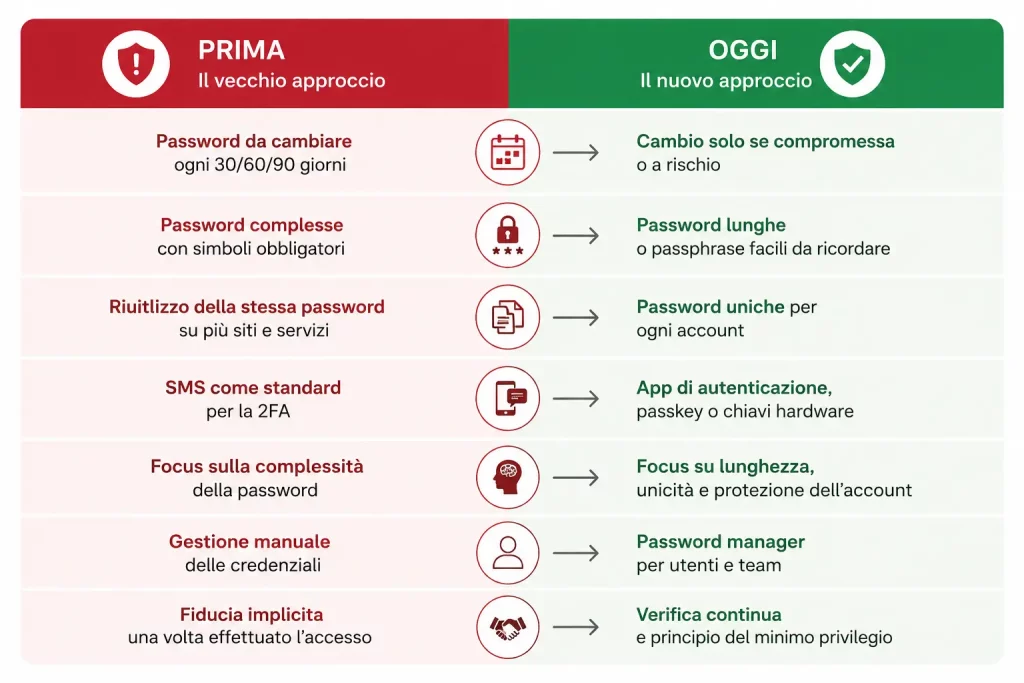
From monthly password changes to passkeys: how authentication standards are changing for both private users and companies.
Why has 2FA become so important?
Even a well-designed password does not eliminate risk. It can be stolen through phishing, malware, reuse after an old data breach or simply through human error.
And this is precisely why learning to recognize attempts at social engineering, deepfakes and manipulated content is becoming an integral part of both personal and corporate digital security.
To protect us from these dangers, 2FA, or two-factor authentication, comes into play.
The logic is simple: to log in, something you know (the password) is no longer enough; a second factor is also required to prove possession of the device or identity. But not all second factors offer the same level of protection.
SMS / voice call
A temporary code is sent via SMS or phone call. Easy to activate, but vulnerable to attacks such as SIM swapping and interception. It is still better than no 2FA, but it is not the recommended choice where alternatives are available.
TOTP apps (temporary codes)
Apps such as Aegis (Android, open source), Raivo (iOS) or Google/Microsoft Authenticator generate one-time codes that expire every 30 seconds. They do not require a connection and are much more secure than SMS. This is the recommended choice for most personal and business accounts.
Passkeys and hardware keys (FIDO2/WebAuthn)
Passkeys are cryptographic credentials linked to the device and standardized by the FIDO Alliance. They eliminate the traditional password and resist phishing by design: they only work on the legitimate website. Physical hardware keys, such as YubiKey, offer the same level of protection in a portable format. More and more services support them.
“The password protects the entrance.
2FA protects access even when the password alone is no longer enough.
But not all 2FA methods are equal: choosing the right method makes the difference.”
Sandro Caneschi, CTO HT&T Consulting
If a service offers several options, the recommended priority is: passkey or hardware key > TOTP app > SMS. Enabling any form of 2FA is still better than having none.
Passwordless authentication
Passkeys: what they are and why they are more secure than passwords
Passkeys are now one of the most concrete evolutions of passwordless authentication, meaning authentication without passwords.
Passkeys are digital credentials based on cryptography that allow users to access a service without typing a traditional password.
In practice, the user confirms access with an already registered device, using fingerprint, facial recognition, PIN or hardware key.
The main difference compared with a password is that the passkey is not remembered, typed or shared by the user.
The service stores a public key, while the private key remains on the user’s device.
This makes passkeys much more resistant to phishing, because they only work on the legitimate domain for which they were created.
For this reason, passkeys are considered one of the most important evolutions in modern authentication. They do not eliminate every risk, but they drastically reduce typical password problems: reuse, theft, interception, weak credentials and submission on fake websites.
Multifactor authentication
Difference between MFA and 2FA: what changes
2FA means two-factor authentication: to log in, two different elements are required, usually a password and a second factor,
such as a temporary code generated by an app, a notification on the phone, a passkey or a hardware key.
MFA, on the other hand, means multifactor authentication. It is a broader concept: it refers to the use of two or more verification factors.
In highly exposed contexts, many companies are adopting forms of phishing-resistant authentication, such as passkeys, FIDO2 and hardware keys.
These factors can belong to three categories: something you know, such as a password; something you have, such as a smartphone or a physical key; something you are, such as a fingerprint or biometric recognition.
In short, 2FA is a form of MFA, but not all MFA is limited to two factors.
In everyday language, the two terms are often used as synonyms, but in a business context it is useful to distinguish them:
MFA refers to a broader access control strategy, while 2FA describes a specific configuration with two verification layers.
The role of password managers
In enterprise contexts, choosing a business password manager means not only protecting credentials, but also governing roles, audits, sharing and privileged access.
If the correct rule is to use long, strong and different passwords for every account, the problem quickly becomes operational: how do you manage dozens or hundreds of credentials without creating chaos?
This is where the business password manager becomes a central tool for users, IT teams and organizations that need to manage shared access securely. Not only because it helps store passwords in an orderly way, but because it allows users to generate, save and fill them in automatically, without forcing people to simplify everything for memory reasons.
Cloud-based
They synchronize credentials across all devices. Convenient and accessible everywhere. Well-known examples: Bitwarden, 1Password, Dashlane.
To assess: the level of trust in the provider and its security and encryption policies.
When credentials are synchronized across devices, browsers and distributed environments, the security of corporate cloud systems also becomes an integral part of access protection.
Local / self-hosted
The vault remains on the device or on a proprietary server. No data is sent to third parties. Examples: KeePassXC, Vaultwarden (self-hosted).
Ideal for those who prefer total control over their data. They require more attention when managing backups.
Open source
The code is public and can be verified by anyone. Bitwarden and KeePassXC are among the most reliable and transparent options in this category.
Code transparency does not guarantee absolute security, but it enables independent audits and greater collective trust.
A good password manager reduces password reuse, makes it easier to adopt strong credentials and helps with controlled access sharing in a business context. Bitwarden, in its free and open-source version, is often recommended as a starting point for those approaching these tools. To learn more about business password managers, we have created an in-depth article explaining 1Password and Bitwarden for cloud and self-hosted solutions.
“The future is about progressively reducing dependence on passwords.”
Linda Guerrazzi, SysAdmin HT&T Consulting
What should we do in the workplace?
In a company, the issue is not just teaching people how to create a good password, but structuring a coherent system. This means defining clear minimum rules, encouraging the use of password managers, enabling 2FA where available, reducing access reuse, applying the principle of least privilege and keeping onboarding, offboarding and permission revocation under control.
In other words, it means adopting processes for digital identity management, user provisioning and access control, which are increasingly central topics in ecosystems such as Google Workspace and Microsoft 365.
It also means moving away from fragile practices such as credentials saved in personal browsers, shared Excel files, local notes or passwords sent in plain text via email and chat. Access security cannot depend on people’s memory or individual habits.
This approach is increasingly integrated with zero trust access models, where no access is considered trustworthy by default, not even within the corporate network.
The password remains important, but on its own it is no longer sufficient as the only strategy. The right combination today is made of good passwords, password managers, 2FA and more mature access policies.
Passwords and authentication: what to expect in the future.
The topic of credentials is undergoing a profound transformation, but we are still in a hybrid transition phase: traditional passwords, passkeys and MFA coexist, and they will probably continue to do so for years. Understanding where we are today helps us choose what to do now, not only in the future.
Passkeys are growing, but adoption is uneven
Apple, Google and Microsoft have integrated passkeys into their ecosystems, and many consumer services already support them. In the corporate and banking sectors, especially in Italy, adoption is still partial. For now, password managers and TOTP apps remain the strongest combination for most real-world scenarios.
The hybrid transition is the real issue
Companies cannot abandon passwords overnight. The period of coexistence between legacy systems and new standards creates mixed attack surfaces. Managing this transition carefully — without leaving users exposed or old systems vulnerable — is now the real operational priority.
Identity providers and SSO as central infrastructure
More and more organizations are centralizing access management on platforms such as Microsoft Entra ID, Google Identity or Okta. This allows them to apply consistent MFA policies, manage onboarding and offboarding in a controlled way and reduce the number of separate credentials to monitor.
Generative phishing changes the risk
Phishing messages produced with artificial intelligence tools are increasingly convincing, personalized and difficult to recognize. This increases the relative value of authentication factors that are phishing-resistant by design — such as passkeys and hardware keys — compared with methods that still rely on user vigilance.
The future is not about eliminating passwords overnight. It is about progressively reducing dependence on them, carefully managing the transition.
What you can do this week
- Activate a password manager if you are not already using one, even the free version
- Enable 2FA with a TOTP app on your most critical accounts (email, bank, work)
- Check whether the services you use already support passkeys on passkeys.directory
- If you manage a team, consider adopting an identity provider with SSO and centralized MFA
- Contact us to speak with a consultant
These changes fit into a broader context of digital identity management: anyone who wants to explore how to structure access, roles and permissions in cloud environments can read our in-depth article on business password managers and access control.
Quick glossary
Key terms to know
Some terms come up often when talking about passwords, authentication and access security.
Knowing them helps you choose better tools and behaviors.
Password manager
Software that generates, stores and automatically fills in long, random and different passwords for every account.
Passphrase
A password made up of several random words. It is long, easier to remember and more resistant than many short and complex passwords.
2FA
Two-factor authentication. In addition to the password, it requires a second verification element such as an app, temporary code or physical key.
MFA
Multifactor authentication. It extends the concept of 2FA using multiple factors: something you know, something you have or something you are.
TOTP
A temporary code generated by an authentication app. It changes every few seconds and is more secure than SMS.
Passkey
A cryptographic credential that allows access without typing a password. It is phishing-resistant because it only works on the legitimate website.
WebAuthn
A web standard that enables secure authentication through passkeys, biometrics or compatible hardware keys.
Credential stuffing
An attack in which credentials stolen from one service are automatically tested across many other accounts.
Frequently asked questions
Is a long password more important than a password full of symbols?
In many cases, yes. Length has a major impact on overall strength. A long, unique and hard-to-predict password is often a better choice than a short password made artificially complex with a few symbols.
Does it still make sense to change passwords every month?
Not as an automatic rule. Today, it makes more sense to change a password when there is evidence of compromise, an incident, an access revocation or a concrete reason, not simply out of habit.
Does 2FA replace a strong password?
No. 2FA does not replace a good password: it strengthens it. The best protection comes from combining strong credentials with a second authentication factor.
Is it correct to use a password manager in a company too?
Yes, and in many cases it is the most sensible choice. It allows better management of long and unique passwords, reduces reuse, enables controlled access sharing and improves operational order.
Are rules such as “one uppercase letter, one number and one symbol” enough?
No. On their own, they are not enough. They can help in some contexts, but if they become the only criterion, they often lead to predictable passwords and trivial variations of known patterns.
What are passkeys?
Passkeys are digital credentials based on cryptography that allow users to access a service without typing a password. They are more resistant to phishing because they only work on the legitimate domain for which they were created.
What is the difference between 2FA and MFA?
2FA requires two authentication factors. MFA is a broader concept and refers to the use of two or more factors. In practice, 2FA is a specific form of MFA.
Are SMS messages a good two-factor authentication method?
SMS messages are better than no protection, but they are not the most secure method. They can be vulnerable to SIM swapping, interception and targeted attacks. Where possible, it is better to use TOTP apps, passkeys or hardware keys.
What is phishing-resistant authentication?
It is an authentication model designed to resist phishing attacks. It includes solutions such as passkeys, FIDO2, WebAuthn and hardware keys, which prevent credentials from being used on fraudulent websites.
Is a business password manager secure?
Yes, if configured correctly. A business password manager allows you to generate strong passwords, control sharing, revoke access, manage roles and reduce the use of credentials stored insecurely.
What does passwordless authentication mean?
Passwordless authentication is an access system that reduces or eliminates the use of the traditional password. It can be based on passkeys, biometrics, hardware keys or already registered devices.
What is the relationship between passwords, MFA and zero trust access?
Strong passwords, MFA and continuous access control are complementary elements. In a zero trust access model, every access is verified based on identity, device, context and risk level.
Bibliography
NIST SP 800-63B
Guidelines on passwords, authentication and assurance levels, with recommendations on length, password managers, blocking compromised passwords and MFA.
CISA — Use Strong Passwords
Practical recommendations on long, random, unique passwords supported by password managers.
CISA — Turn on MFA
Practical guidance on the role of multifactor authentication as an additional layer of protection beyond the password alone.
Continua a leggere
12 minutes of reading

4 minutes of reading


And it consumes less energy.
To return to the page you were visiting, simply click or scroll.