Google Tag Gateway: How It Works, Setup & GA4 Benefits

Web Analytics · Google Analytics 4 · Google Tag Manager
GTG: what it is, how it works, and how to configure it for GA4 and Google Ads
Google Tag Gateway is a Google solution that allows the Google tag to be loaded and part of the measurement requests to be routed through the website’s first-party domain, instead of communicating directly from the browser with Google domains.
The goal is to make the measurement infrastructure more resilient to limitations introduced by browsers and blocking systems, improving signal recovery for Google Analytics 4 and Google Ads without necessarily requiring a dedicated server-side infrastructure.
The name used in the international documentation is Google tag gateway for advertisers. The solution can be implemented using infrastructure already positioned in front of the website, such as a CDN, load balancer, or web server, with simplified integrations available for some platforms.
In short
The Google tag and part of the measurement requests are routed through the website’s domain.
The gateway does not replace a server-side container when data transformation, control, and routing are required.
First-party does not automatically mean consented: Consent Mode and CMPs remain separate elements.
With a supported CDN, activation may require limited technical effort compared with a complete server-side architecture.
Why Google introduced Tag Gateway
Digital measurement has become increasingly complex. Browsers, operating systems, privacy settings, consent management, and content-blocking tools can reduce the amount of signals available to analytics and advertising platforms.
In a traditional configuration, a web page loads the Google tag from a Google domain and sends requests generated by GA4 or advertising systems directly to Google’s infrastructure. This architecture makes the request destination immediately identifiable as infrastructure external to the website.
Google Tag Gateway introduces an intermediate layer: the browser initially communicates with an endpoint belonging to the same domain as the website, and the infrastructure configured in front of the website then forwards the requests to Google services. Data collection takes place at the same infrastructure layer where the website pages are served.
The change may appear small, but it modifies an important part of the architecture: the first point of communication used by the tag becomes first-party. Google reports an average 14% recovery in reported conversions, which can translate into better-informed decisions and more efficient advertising spend.
reported conversions on average
Google Ads reported an average 14% uplift in reported conversions among advertisers that adopted Google Tag Gateway, based on internal Google data.
the new signal path
Tags and measurement requests are loaded and sent through the company’s domain before being forwarded to Google.
mandatory dedicated servers
With implementations based on a CDN or existing infrastructure, there is no need to introduce a dedicated server-side container.
Source for the +14% figure: Google Internal Data, Global, Finance, July–December 2024 compared with January–June 2025. The result does not represent a guaranteed increase for every implementation: actual recovery depends on traffic, browsers, blocking systems, consent, and technical configuration.
What exactly is Google Tag Gateway?
Google Tag Gateway can be described as a system for first-party tag serving and first-party measurement routing.
Google documentation supports implementations through infrastructure such as CDNs, load balancers, or web servers. For some CDNs, integrated setup procedures are available, significantly reducing technical complexity.
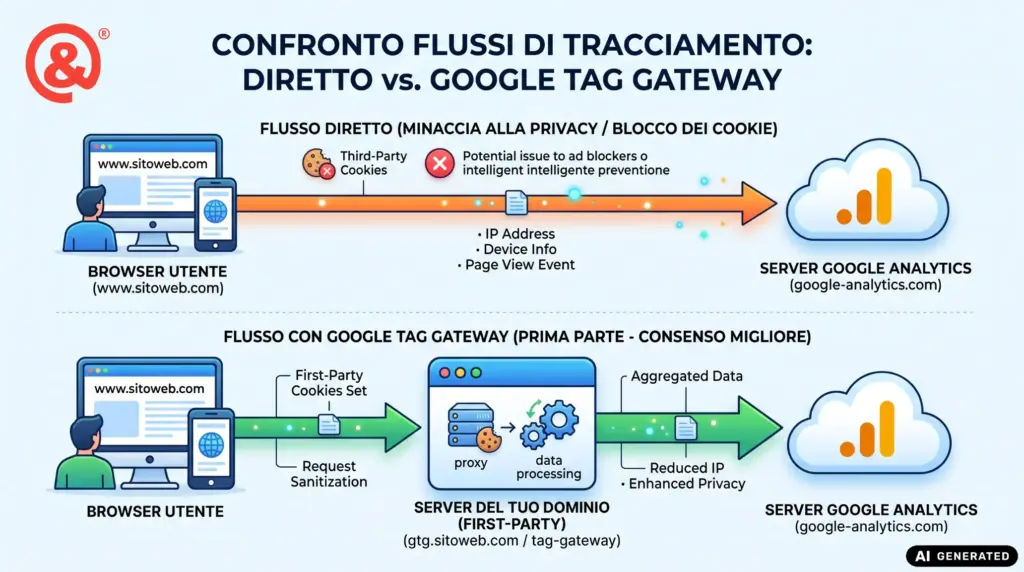
What changes in data collection?
The most interesting aspect of Google Tag Gateway is not the URL used by the tag, but the possibility of making the chain through which measurement signals reach Google more robust.
Google presents the solution as a way to improve signal measurement recovery and measurement accuracy. In other words, in certain configurations, some signals that might not be observed with a traditional implementation can be recovered through the first-party infrastructure.
This can affect not only Google Analytics 4 reports, but also the signals used by advertising systems for attribution, conversion measurement, and algorithmic optimization.
However, this does not mean that all previously missing events will automatically appear in GA4 after activation. The outcome depends on the technical configuration, browser, blocking systems used by visitors, consent management, and the overall quality of the implementation.
For this reason, the effectiveness of Tag Gateway should be measured before and after activation, avoiding generic improvement percentages that may not be representative of a specific project.
Google Tag Gateway and server-side GTM are not the same thing
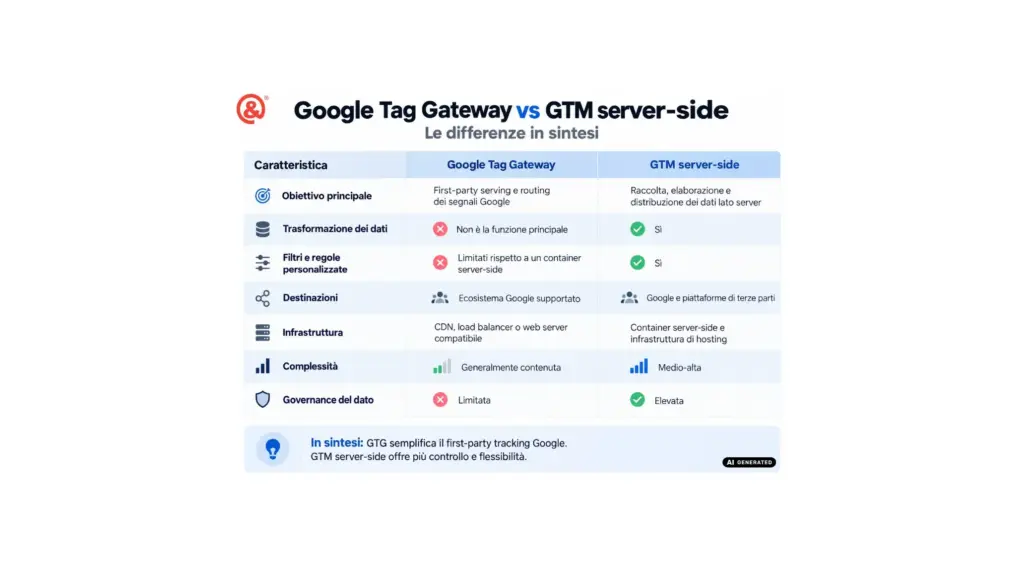
This is probably the most important distinction to make. Google Tag Gateway and Google Tag Manager server-side both affect the measurement architecture, but they solve different problems.
| Feature | Google Tag Gateway | GTM server-side |
|---|---|---|
| Main objective | First-party serving and routing of Google signals | Server-side collection, processing, and distribution of data |
| Data transformation | Not its main function | Yes |
| Custom filters and rules | Limited compared with a server-side container | Yes |
| Destinations | Supported Google ecosystem | Google and third-party platforms |
| Infrastructure | Compatible CDN, load balancer, or web server | Server-side container and hosting infrastructure |
| Complexity | Generally lower | Medium to high |
| Data governance | Limited | High |
The point, therefore, is not to determine which of the two is better in absolute terms.
Tag Gateway is useful when the main goal is to make Google measurement more resilient with a relatively simple implementation. Server-side tagging becomes important when you need real control over the data flow.
To explore the full architecture in more detail, we have published a dedicated guide to server-side tracking, how it works, and the cases in which it becomes truly useful.
Google Tag Gateway, cookies, and Consent Mode: do not confuse the concepts
One of the most common mistakes when discussing first-party tracking is assuming that a request coming from the website’s own domain can be executed regardless of the user’s choices.
That is not the case.
Google Tag Gateway changes the technical architecture through which tags are loaded and signals are forwarded. It does not replace a CMP, it does not determine the legal basis for processing, and it does not override the preferences expressed by the user.
Google itself explicitly highlights the need to verify the Consent Mode configuration whenever activating the gateway changes tag behavior.
First-party ≠ consent
The fact that a request uses the website’s own domain does not mean it can be executed while ignoring the user’s preferences. Tracking architecture and consent management are two separate layers that must be designed together.
If the website already uses Google Consent Mode, the integration should therefore be carefully reviewed before enabling any automatic tag-injection mechanisms.
We have published a dedicated guide on Google Consent Mode V2 and consent signal management.
What are the real benefits of Google Tag Gateway?
The main advantage is the balance between implementation complexity and the potential improvement in measurement quality.
First-party measurement
The Google tag and part of the measurement requests use the website’s first-party infrastructure.
Greater resilience
The architecture can recover part of the signals that a standard setup may lose because of certain technical restrictions.
Simpler implementation
For websites that already have compatible infrastructure, activation is generally much less demanding than designing a complete server-side system.
Continuity with GA4 and Google Ads
The gateway integrates with Google’s measurement ecosystem without requiring the entire tracking plan to be rebuilt.
What Google Tag Gateway does not solve
It is equally important to understand its limitations.
Google Tag Gateway does not make tracking immune to ad blockers. More advanced systems can recognize patterns, endpoints, or network behavior even when requests are routed through a first-party domain.
It also does not fix an incorrect GA4 configuration, duplicated events, poorly implemented ecommerce tracking, inconsistent UTM parameters, or dataLayer errors.
Most importantly, it does not automatically turn poor data collection into a good measurement strategy.
Making incorrect data first-party simply means collecting incorrect data more effectively.
Before changing the infrastructure, it is therefore essential to verify the quality of the tracking setup. In our guide to GA4 for ecommerce, events, conversions, and tracking configuration, we examine some of the issues we most frequently encounter during analytics audits.
How to implement Google Tag Gateway: where should requests be routed?
Using Google Tag Gateway is not simply a matter of enabling a setting in Google Analytics or Google Ads: there must be a first-party infrastructure capable of receiving and forwarding requests between the user’s browser and Google services.
In a traditional setup, the flow can be simplified as follows:
Browser → Google domains → Google Analytics / Google Ads
With Google Tag Gateway, the path changes:
Browser → website domain → first-party infrastructure → Google
The intermediate infrastructure can be a CDN, a load balancer, a web server, or, in certain architectures, a Google Tag Manager server-side container.
The principle is always the same: the browser no longer has to load the tag and send measurement requests directly to a Google domain. Instead, the first endpoint belongs to the website’s own domain.
Which infrastructure can be used?
Google currently supports several implementation paths. The choice depends on the infrastructure already used by the website.
| Infrastructure | Method | When to use it |
|---|---|---|
| Cloudflare | Guided integration with Google Tag Gateway | Websites already using Cloudflare as a CDN or reverse proxy |
| Akamai | Google-supported CDN integration | Enterprise infrastructures using Akamai |
| Fastly | CDN-based configuration | Websites using Fastly in front of the origin server |
| Google Cloud Load Balancer | Configuration through Google Cloud infrastructure | Applications already hosted behind Google Cloud Load Balancing |
| Web server / custom CDN | Self-service configuration | When no automated integration is available but the infrastructure can proxy requests |
| GTM server-side | Gateway enabled through the server container | When a Google Tag Manager server-side architecture is already in place |
1. Implementation with Cloudflare
Cloudflare is probably the simplest scenario because Google provides a direct integration.
If the domain already uses Cloudflare, you can access the Google tag settings from Google Analytics, Google Ads, or Google Tag Manager, select Google Tag Gateway, and connect the Cloudflare account.
Google and Cloudflare then configure the first-party path used by the tag and measurement requests.
With an automated integration, the website’s original source code may continue to contain references to googletagmanager.com: the infrastructure can automatically rewrite requests while the page is being delivered.
Cloudflare also offers a separate, full-featured solution called Cloudflare Zaraz, a tag management system built directly into Cloudflare’s edge network. Unlike traditional tag managers such as GTM, which load and execute multiple JavaScript scripts directly in the user’s browser, Zaraz moves much of that execution to Cloudflare’s edge infrastructure, with potential benefits for page speed and Core Web Vitals.
2. Implementation with Akamai or Fastly
Cloudflare is not the only CDN that can be used.
Google also documents implementation paths through other CDNs, including Akamai and Fastly. The technical concept is the same: a rule configured on the CDN intercepts requests sent to a specific path on the website’s domain and forwards them to Google’s infrastructure.
For example, the website could use a measurement path such as:
https://www.example.com/metrics/The CDN identifies requests sent to that path and forwards them to the Google endpoints defined by the gateway configuration.
3. Implementation through Google Cloud Load Balancer
If the website is already hosted on Google Cloud and uses Google Cloud Load Balancer, Google provides a dedicated configuration path.
In this scenario, the load balancer acts as the first-party infrastructure between the browser and Google services, avoiding the need to introduce a CDN solely for Google Tag Gateway.
4. Self-service implementation with a CDN, load balancer, or web server
When no automated integration is available, Google Tag Gateway can also be configured in self-service mode.
In this case, the infrastructure must be configured manually so that a specific path on the website’s domain is forwarded to the Google endpoints specified in the documentation.
Unlike automated integrations, a self-service configuration also requires the website tagging setup to be modified so that the Google tag is loaded from the new first-party measurement path.
Be careful with self-service configuration
If the website source code continues to load scripts directly from googletagmanager.com, the browser will continue to communicate directly with Google and the gateway will effectively be bypassed. In manual configurations, the path used by the tag must therefore be explicitly changed.
5. If you already use Google Tag Manager server-side
If a Google Tag Manager server-side container is already in place, it generally makes little sense to build a second separate infrastructure solely for the gateway.
Google provides a specific implementation path that allows Google Tag Gateway to be enabled through the existing server-side architecture.
In this case, the flow can become:
Browser → first-party domain → GTM server-side → Google Analytics / Google Ads
This configuration combines the benefits of first-party delivery with the more advanced capabilities of server-side tagging, including data transformation, filtering, and routing.
When does it make sense to implement Google Tag Gateway?
There is no single answer that applies to every website.
For a website that uses GA4 and Google Ads, already has compatible infrastructure, and has a properly configured consent management system, Google Tag Gateway is currently an option that should be seriously considered.
The balance between implementation complexity and potential benefit is particularly interesting for ecommerce, lead generation, and websites with significant Google Ads investment, where even relatively small improvements in signal quality can affect analysis and automated optimization systems.
When a project instead requires integration with CRM systems, Meta Conversion API, multiple advertising platforms, data warehouses, advanced deduplication, or data transformation, the gateway alone is not enough and it generally makes more sense to design a complete server-side architecture.
Google Tag Gateway or a server-side solution?
Google Tag Gateway should not be confused with a server-side tagging platform. Both solutions affect the measurement infrastructure, but they serve different purposes and provide different levels of control.
Google Tag Gateway is primarily designed to make Google tag loading and signal routing to Google products first-party, including Google Analytics 4 and Google Ads. Its main goal is to improve measurement resilience without necessarily requiring the management of a complete server-side infrastructure.
A server-side solution, on the other hand, introduces a true application layer between the browser and the destination platforms. Events are sent to a first-party endpoint and then processed by a server container or infrastructure that can filter, transform, enrich, and route the data.
This infrastructure can be built directly on cloud services, something HT&T regularly implements, or through specialized platforms that simplify server-side tagging hosting and management, such as Stape.
| Aspect | Google Tag Gateway | Server-side solution |
|---|---|---|
| Main objective | First-party serving and routing of Google signals | Complete management of the server-side data flow |
| Destinations | Mainly the Google ecosystem | Google, Meta, TikTok, and other platforms |
| Data transformation | Limited | Yes |
| Custom filters and rules | Limited compared with a server-side container | Yes |
| Event enrichment | Not its main function | Yes, when supported by the architecture |
| Dedicated infrastructure | Not necessarily | Yes |
| Cost | No specific cost for the Google feature itself, apart from the infrastructure being used | Hosting, traffic, and any managed platform costs |
| Complexity | Generally lower | Higher, but with greater control |
The difference can be summarized as follows: Google Tag Gateway mainly changes the path through which Google signals travel, while server-side tagging allows you to intervene on the data before it is sent to the destination platforms.
For a website that mainly uses GA4 and Google Ads and wants to improve its first-party infrastructure with a relatively limited intervention, Google Tag Gateway may be sufficient.
When it is necessary to integrate multiple advertising platforms, apply transformation logic, manage deduplication, enrich events, or gain greater control over data governance, a server-side solution is generally more appropriate.
Tracking and data quality
Google Tag Gateway is part of a broader transformation in digital measurement.
The model in which every interaction could be observed in the browser and attributed precisely to a single user is becoming increasingly unrealistic. The future of measurement combines first-party data, Consent Mode, server-side tracking, conversion modeling, incrementality testing, and statistical models.
For this reason, recovering more events should not become an end in itself.
Do the data we collect actually help us make better decisions?
This is the same challenge we face when discussing marketing attribution. Even with a technically perfect tracking infrastructure, no single platform has a complete view of the user journey.
In our dedicated guide to attribution, Multi-Touch Attribution, Lift Tests, and Marketing Mix Modeling, we explain why it is now more appropriate to combine different measurement methods rather than search for a single perfect number.
HT&T case study
Google Tag Gateway on htt.it: +18% uplift in data collection
To evaluate Google Tag Gateway, we did not rely solely on the official documentation: we implemented it directly on htt.it, the HT&T Consulting website, which runs on WordPress and already had an active GA4 setup.
HT&T Consulting is Google Marketing Platform Certified and works on digital measurement projects involving Google Analytics 4, Google Tag Manager, and Google advertising platforms. We therefore also used the implementation of Google Tag Gateway on htt.it as a direct test on our own infrastructure, with the aim of assessing its real impact on signal collection.
The website records an average of approximately 1,000 users and 2,000 sessions per month. After activating Google Tag Gateway, we compared the amount of data collected with the previous configuration and observed an 18% uplift.
uplift in collected data
Difference observed after activating Google Tag Gateway.
users per month
Average monthly user volume used for the comparison.
sessions per month
Average monthly number of sessions recorded on htt.it.
platform used
Implementation carried out on the HT&T corporate website.
What does the +18% actually mean?
The result does not mean that Google Tag Gateway generated new traffic. The users were already visiting the website: what increased was the measurement infrastructure’s ability to observe the signals produced during their sessions.
This is an important distinction. When an analytics system loses part of the requests, the missing data do not necessarily appear as an error: they simply never reach the platform. Making the path used by the Google tag first-party can help recover part of those signals.
The key point
In our test, we did not change the measurement plan or add new events to obtain the result. What changed was the infrastructure through which tracking requests reached Google. The uplift observed is therefore related to improved data collection, not to an artificial increase in the number of configured events.
Why the result is relevant even for a website with modest traffic volumes
htt.it is neither a publishing platform with millions of visits nor a large ecommerce website: with around 2,000 monthly sessions, it is much closer to the scale of many corporate and B2B websites.
That is precisely why the result is significant. An 18% uplift shows that signal loss can also be relevant for small and mid-sized websites, not only for large ecommerce businesses or advertisers with very high traffic volumes.
For projects with significant advertising investment, the same principle can become even more important: better conversion data collection can provide more signals to attribution systems and Google Ads optimization algorithms.
A figure to interpret, not a guaranteed result
The +18% measured on htt.it is the result of our specific implementation and should not be considered a percentage that can automatically be replicated on every website.
The uplift may vary depending on traffic composition, browsers, blocking technologies, consent management, the previous tracking configuration, and the technical infrastructure in use.
For this reason, we recommend treating Google Tag Gateway like any other analytics infrastructure change: establish a baseline, technically verify request routing, and compare the data collected before and after activation.
Is Google Tag Gateway worth it?
For many companies, the answer is yes, provided it is implemented within the right measurement architecture.
Google Tag Gateway helps bridge the gap between traditional client-side tracking and more advanced first-party infrastructures. It can improve the resilience of Google measurement without necessarily requiring the complexity of a complete server-side project.
However, Google Tag Gateway does not replace Consent Mode, a CMP, Google Tag Manager server-side, or a properly designed GA4 implementation.
Its value becomes clear when it is considered for what it actually is: another component within a modern first-party measurement architecture.
And in a digital ecosystem where an increasing share of advertising decisions is made by algorithms, the quality of the signals used to feed those systems is no longer just a technical issue: it is a business variable.
Frequently asked questions about Google Tag Gateway
What is Google Tag Gateway?
Google Tag Gateway is a Google solution that allows the Google tag to be loaded and part of the measurement requests to be routed through the website’s first-party domain, using infrastructure such as a CDN, load balancer, or web server.
Does Google Tag Gateway replace Google Tag Manager server-side?
No. Google Tag Gateway improves first-party serving and routing of Google signals, while GTM server-side can receive, process, transform, and distribute data to Google and other platforms. The two technologies can be complementary.
Can Google Tag Gateway bypass ad blockers?
It can make measurement more resilient to some forms of blocking because requests use the website’s first-party domain, but it does not make tracking immune to ad blockers. More sophisticated systems can also identify first-party requests through patterns and other techniques.
Does Google Tag Gateway replace Consent Mode?
No. The gateway concerns the technical measurement architecture, while Consent Mode communicates the user’s consent status to Google tags. First-party tracking and consent are separate concepts.
Do you need Cloudflare to use Google Tag Gateway?
Not necessarily. Cloudflare offers one of the simplest integrations, but Google also documents implementations through compatible CDNs, load balancers, and web servers, as well as self-service setup procedures.
How can you verify that Google Tag Gateway is working?
Google recommends using Tag Assistant and checking that hits are routed through the configured measurement path. It is also useful to inspect requests in the browser’s Network panel and monitor GA4 and Google Ads after activation.
Does Google Tag Gateway improve GA4 data?
Google presents the gateway as a solution designed to improve signal recovery and measurement accuracy. The actual improvement, however, depends on the website, infrastructure, browsers, blocking systems, consent management, and the quality of the existing implementation.
Sources and further reading
For the technical sections of this article, we relied on official Google documentation and HT&T resources dedicated to modern measurement architectures.
Google tag gateway for advertisers
Google for Developers
Official technical documentation covering the architecture, prerequisites, and configuration options for Google Tag Gateway.
Google Tag Gateway with Cloudflare
Google Tag Manager Help
Official guide to configuring the gateway through Cloudflare and verifying the setup with Tag Assistant.
Server-Side Tracking
HT&T Consulting
An in-depth guide to the differences between client-side and server-side tracking and how to design a more advanced measurement architecture.
Consent Mode V2
HT&T Consulting
A guide to consent management and the signals used by the Google ecosystem for analytics and advertising.
Continua a leggere
19 minutes of reading

19 minutes of reading

And it consumes less energy.
To return to the page you were visiting, simply click or scroll.