Shopify llms.txt, agents.md and UCP: Agentic Commerce Guide

Agentic Commerce
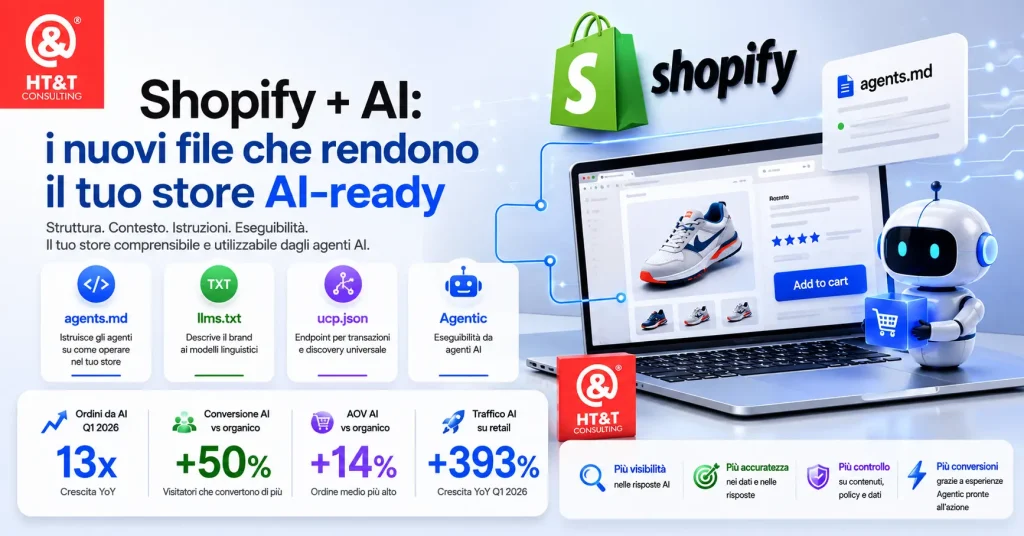
In May 2026, Shopify enabled three files across all stores that change how an e-commerce site is discovered and purchased through artificial intelligence: /llms.txt, /llms-full.txt and /agents.md. If you have a Shopify store, these files already exist. The question is: are you using them to your advantage?
Update note: Shopify has confirmed in its official documentation that /agents.md is the canonical file for AI agent discovery, while /llms.txt and /llms-full.txt are URLs maintained for compatibility with crawlers and previous conventions. By default, all three URLs may return the same content, but they can be customized through Liquid templates in the theme.

What Shopify Quietly Did
Between December 2025 and May 2026, Shopify made three precise moves—without press releases, without fanfare—that redefine where and how online purchasing takes place:
- Winter ’26 Edition (December 2025): launch of Agentic Storefronts, making product catalogs purchasable directly inside ChatGPT, Microsoft Copilot and Perplexity.
- January 2026: Shopify and Google announce the Universal Commerce Protocol (UCP), an open standard for AI transactions across any e-commerce platform.
- May 2026: silent rollout of
/llms.txt,/llms-full.txt,/agents.mdand the/.well-known/ucpendpoint across all active stores.
The numbers make the urgency tangible:
AI-generated orders — Q1 2026
13x
YoY growth (Shopify Q1 2026 earnings)
AI vs organic conversion
+50%
AI visitors convert better (Shopify)
AI vs organic AOV
+14%
Higher average order value from AI searches
AI retail traffic
+393%
YoY growth Q1 2026 (Adobe Analytics)
“Shopify is the only platform simultaneously powering selling inside ChatGPT, Microsoft Copilot and Google from one system of record.”
To better understand the broader context of how AI is transforming search and visibility, read our in-depth articles on Agentic eCommerce: ACP, UCP and Amazon and Shopify Agentic Commerce: AI-Driven Commerce.
llms.txt, llms-full.txt and agents.md: What’s the Difference?
These are three distinct files with different but coordinated purposes. Here’s how they work:
Brand identity
/llms.txt
Describes the store to language models: who you are, what you sell and which policies you offer. It is the business card for AI systems trying to understand your brand.
Extended catalog
/llms-full.txt
The same structure as llms.txt but with additional details on products and collections. Used by AI crawlers seeking deeper indexing.
Primary file
/agents.md
It does not only describe the brand: it explains to an AI agent how to operate within the store. UCP endpoints, purchasing flows, rate limits and checkout rules.
In short: llms.txt is for language models (brand understanding), while agents.md is for operational agents (transaction execution). On Shopify, by default, all three files serve the same content—but you can customize them separately.
What’s Inside agents.md: A Real Example
We analyzed the agents.md file of an Italian cosmetics e-commerce store built on Shopify (lcicosmetics.com/agents.md). These are the main sections automatically generated by Shopify:
1. Instructions for AI Personal Shoppers
The file recommends that agents install the Shop Skill (https://shop.app/SKILL.md), Shopify’s official tool for agents purchasing on behalf of users. It manages cross-store search, Shop Pay checkout, order tracking and reuse of previously authorized payment methods.
2. Universal Commerce Protocol (UCP)
The file exposes two critical transaction endpoints:
# Discovery endpoint
GET https://yourstore.com/.well-known/ucp
→ UCP profile: versions, endpoints, capabilities, payment handlers

# MCP endpoint (transactions)
POST https://yourstore.com/api/ucp/mcp
→ Accepts JSON-RPC: search_catalog, create_cart, create_checkout
3. Typical Flow of an AI Purchasing Agent
- Discover:
GET /.well-known/ucp, verifies store capabilities - Search:
search_catalog, finds products based on user intent - Cart:
create_cart, adds selected products - Checkout:
create_checkout, initiates the purchase process - Fulfill:
update_checkout, sets address and shipping details - Complete:
complete_checkout, finalizes the order (always requires human approval)
4. Read-Only Navigation Without Authentication
GET /collections/all          → all products
GET /products/{handle}.json   → specific product in JSON
GET /search?q={query}         → search by keyword
GET /sitemap.xml              → complete sitemap
How to Enable and Verify: A Practical Checklist
The rollout is happening store by store. To verify whether your store is already active:
✅ Agentic Storefronts Verification Checklist
- Open
yourstore.com/llms.txtin your browser. It should return a 200 response, not a 404. - Open
yourstore.com/agents.md. It should return a 200 response. - Open
yourstore.com/.well-known/ucp. It should return JSON with the store capabilities. - In Shopify Admin: Settings → Sales Channels → verify that Agentic Storefronts is enabled.
- Check that new products are added to the agentic sales channel (this does not always happen automatically).
- Verify the catalog mapping under Admin → Mappings.
If one of these files returns a 404 response, the store is not yet included in the rollout. In that case, contact Shopify Support to verify eligibility.
How to Customize llms.txt and agents.md
Shopify automatically generates these files from your catalog data. However, you can—and in many cases should—customize them using Liquid templates within your theme. Three templates are available:
Modify all three
agents.md.liquid
Changes the content served by all three URLs. Recommended starting point.
Only /llms.txt
llms.txt.liquid
Specific override for /llms.txt. Takes precedence over agents.md.liquid for that URL.
Only /llms-full.txt
llms-full.txt.liquid
Specific override for /llms-full.txt. Useful for adding extended catalog details.
⚠️ Never remove Shopify-generated UCP hooks. Breaking those links can disconnect the store from AI agents. Add content, do not replace the underlying structure.
What to Add During Customization
📝 High-Value Content for AI Agents
- Brand description written in natural language and aligned with purchase intent
- Catalog categories and specializations (e.g. “COSMOS-certified vegan cosmetics”)
- FAQs about the most searched products
- Direct information about shipping, returns and warranties
- Links to main collections with descriptions of their contents
- Geographical context: shipping countries, delivery times and carriers
Shopify Knowledge Base: Teach AI How to Talk About Your Brand
Customizing agents.md helps describe your store structure to AI agents. But there is another level, often overlooked: what AI answers when a customer asks something about your brand. “Do you offer 24-hour shipping?” “Can I return products within 30 days?” “Are your products vegan?”
Without explicit instructions, AI agents generate answers based on what they find while scanning your website—with all the risks of inaccuracies that this entails. Shopify Knowledge Base is the free app designed to solve this problem.
“The Shopify Knowledge Base app lets you view Shopify-generated FAQs, monitor what buyers are asking AI agents about your store, and add your own answers to make sure you’re always accurately represented.”
How It Works in Practice
The app does not generate a visible file on the website. Instead, it acts as a structured knowledge source that AI agents consult in the background when answering questions about your store. The FAQs you upload do not appear publicly on the site. They become a verified knowledge layer, separate from the product catalog, that agents use to provide accurate answers.
📚 What You Can Do with Knowledge Base
- See the real questions customers ask AI agents about your store
- Monitor whether AI can answer them correctly or falls back to generic responses
- Add or correct FAQs to ensure accurate, brand-aligned answers
- Upload structured policies: returns, shipping, warranties and brand voice guidelines
- Track trends in what customers are asking during AI conversations
What to Upload to Maximize Effectiveness
Not all information carries the same weight. AI agents primarily use the knowledge base for decision-making questions—those that determine whether a purchase is completed or abandoned:
Clear policies = more sales
⚠️
If an agent cannot find a return policy, it may exclude the store from results for users searching for “free returns”
Post-purchase questions
📦
Shipping, delivery times, tracking and returns are among the most common AI conversation topics according to Shopify
✅ Priority Content to Upload
- Return policies — timelines, conditions and procedures (one of the most common filters used by AI agents)
- Shipping information — countries served, carriers, estimated delivery times and free shipping thresholds
- Certifications and brand values — vegan, cruelty-free, sustainable, made in Italy
- Sizing and compatibility — sizing guides, product compatibility and usage recommendations
- Payments and security — accepted payment methods, data security and checkout information
- Brand voice guidelines — how you want AI to describe your brand and products
The Critical Point: Knowledge Base Does Not Appear in agents.md
This is where the most common misunderstanding lies. FAQs uploaded to Knowledge Base do not automatically appear in agents.md or llms.txt. They are delivered through separate endpoints managed internally by Shopify. An AI agent does not retrieve them through the discovery file; it receives them when performing a brand-specific query through the agentic channel.
Practical consequence: Knowledge Base and agents.md are not alternatives—they are complementary. The agents.md file tells the agent how to navigate and transact within your store. Knowledge Base tells the agent what to answer when customers ask questions about your brand. Both are required, each serving a distinct role.
🔍 agents.md vs Knowledge Base: Distinct Roles
- agents.md → operational instructions for the agent: UCP endpoints, purchasing flow and rate limits
- Knowledge Base → informational content for the agent: FAQs, policies, brand voice and certifications
- Together → a store that is fully readable, navigable and accurately represented by AI systems
“Think of Shopify’s agentic storefronts as your product catalog, checkout, and brand information packaged so AI platforms can present them natively in a conversation.”
Shopify has confirmed that Knowledge Base does not influence how often a store appears in AI results—that depends on the catalog and the quality of product data. However, it directly affects the accuracy of responses when the store is referenced. It is the difference between a store that gets found and a store that gets chosen.
Agentic Commerce Is Now Open to the Italian Market
With the May 2026 rollout, Agentic Storefronts are now available to Italian stores as well, with access from Perplexity and other AI engines in addition to ChatGPT and Copilot. Google AI Mode and Gemini integrations are underway.
An Italian user asking Perplexity, “show me a vegan lipstick under €30 with fast shipping,” can see your product directly within the response, complete with a purchase button, provided the catalog is correctly configured within the agentic sales channel.
🇮🇹 What to Verify for the Italian Market
- New products are added to the agentic sales channel
- The catalog includes complete and accurate Italian-language descriptions
- Return, shipping and privacy policies are available in Italian and published at public URLs
- Catalog mapping is configured (Admin → Mappings)
- Pricing and availability are updated in real time
llms.txt and agents.md in the HTT Model: The Fourth Layer
These files do not replace SEO. They extend it. Traditional SEO optimizes for search engines. AI discovery files optimize for operational agents that do not search for web pages but instead execute tasks on behalf of users.
Layer 1
SEO
Traditional search engines
Layer 2
AEO
Answer engines and zero-click experiences
Layer 3
GEO
Citability within generative AI systems
Layer 4
Agentic
Executability by AI agents
To explore the previous layers in greater depth: Answer Engine Optimization, From SEO to GEO and llms.txt: Training AI for Website SEO.
What to Do If You Have a Shopify Store
🚀 Six-Step Action Plan
- Verify the files exist: open
yourstore.com/agents.mdin your browser. Does it respond? Then you’re in the rollout. - Check the agentic channel: Settings → Sales Channels → Agentic Storefronts must be active.
- Add new products to the agentic catalog: this does not happen automatically for every store and may require configuration.
- Verify catalog mapping: Admin → Mappings. This determines how AI systems categorize your products.
- Customize agents.md.liquid with your brand description, key FAQs and links to collections.
- Test the UCP endpoint:
yourstore.com/.well-known/ucp→ it must return valid JSON.
How to Optimize Your Store for AI Agents
Customizing agents.md and llms.txt is only one part of the process. To be selected by an AI agent, your store must provide complete, up-to-date and semantically clear product data. In practice, GEO for Shopify begins with the catalog.
Priority Actions to Improve AI Readability
- Descriptive product titles: include category, material, key benefit or primary use case.
- Intent-driven descriptions: explain who the product is for, when it should be used and why it should be chosen.
- Complete metafields: materials, dimensions, certifications, compatibility, ingredients and delivery times.
- Public FAQs: concise answers about shipping, returns, warranties, sizing, availability and product usage.
- Clear policies: returns, privacy, shipping and payment policies should be public, updated and linkable.
- Trust signals: reviews, certifications, real-time availability, updated pricing and supporting editorial content.
The principle is simple: AI agents do not “browse” the way humans do. They retrieve data, interpret attributes, compare options and decide what to show based on the quality of the available information.
Conclusion
Shopify has quietly built the infrastructure for agentic commerce. The files llms.txt, llms-full.txt and agents.md are not technical details to be delegated. They are your store’s business card for the AI systems that will manage a growing share of online purchases.
The competitive advantage today is not having these files—every Shopify merchant already has them. The advantage lies in optimizing them while most merchants are still unaware they exist. This opportunity will not last long. Contact us for a free audit of your Shopify store and discover what we can do for your business.
“More than half of AI-referred sessions start on product pages, compared to 20% for organic search. AI-referred shoppers arrive with higher purchase intent — they already know what they want.”
Sources and Further Reading
Agentic Storefronts and Product Data Mapping
Official Shopify documentation covering Agentic Storefronts configuration, product data mapping and how catalogs are made available to AI agents.
Agentic Storefronts
Official overview of Shopify’s agentic sales channel, available features and integration options.
Agentic Commerce
How Shopify defines agentic commerce and the role AI agents will play in the future of online shopping.
AI Search Insights
Official Shopify data on users arriving from ChatGPT, Perplexity, Copilot and other AI-powered systems.
Agentic eCommerce: ACP, UCP and Amazon
An analysis of the protocols that allow AI systems to make purchases and transactions on behalf of users.
Shopify Agentic Commerce
A strategic overview of how Shopify stores are evolving toward AI-agent-driven commerce models.
llms.txt: Training AI Systems
A practical guide to using llms.txt to improve AI understanding, citability and indexing.
From SEO to GEO
How digital positioning is evolving in the age of answer engines and generative artificial intelligence.
FAQ
Do all Shopify stores already have llms.txt and agents.md?
The rollout took place store by store between April and May 2026. To verify, open yourstore.com/llms.txt in your browser. If it returns text instead of a 404 error, the file is active.
What is the practical difference between llms.txt and agents.md?
On Shopify, all three files serve the same content by default. The difference lies in their intended audience: llms.txt is designed for language models (brand understanding), while agents.md is the canonical file for operational agents that want to execute transactions through UCP.
Does information stored in the Knowledge Base appear inside agents.md?
No, not automatically. Knowledge Base applications serve their information through separate endpoints that must be declared within the UCP configuration. The most reliable short-term solution is ensuring that key FAQs are accessible as public pages on your website.
Is AI-agent checkout secure? Who approves the payment?
Agentic checkout should not be interpreted as a fully autonomous purchase. Depending on the AI platform, the user is redirected either to the store checkout or to an integrated checkout experience where final approval of the purchase is required. Shopify manages infrastructure, payment processing, tax calculation and checkout security, while the merchant remains the Merchant of Record and retains the customer relationship.
Does llms.txt work on WooCommerce or other CMS platforms?
Yes. llms.txt is an open standard and not proprietary to Shopify. On other platforms it must be created and maintained manually. Shopify’s advantage is that it also includes UCP hooks for transactional capabilities. Read our guide: llms.txt: Training AI for Website SEO.
Do these files replace traditional SEO?
No. SEO remains essential for organic visibility. AI discovery files add a fourth layer—the agentic layer—making a store executable by AI agents. The two layers are complementary, not alternative.
Continua a leggere
22 minutes of reading

32 minutes of reading


And it consumes less energy.
To return to the page you were visiting, simply click or scroll.