Ecommerce Feed Manager: What it is and how to optimize your product Feed

Ecommerce & Performance Marketing
(also known as a product feed, shopping feed or ecommerce feed)
Ecommerce Feed Manager: The complete guide to Product Feeds for Google Shopping, Performance Max and AI Commerce
A product feed is the document that tells Google, Meta and TikTok which products you sell, at what price and with what availability. If it is incorrect, incomplete or outdated, your products may not be shown. If it is optimized, it becomes a direct competitive advantage for ROAS and visibility.

In Brief
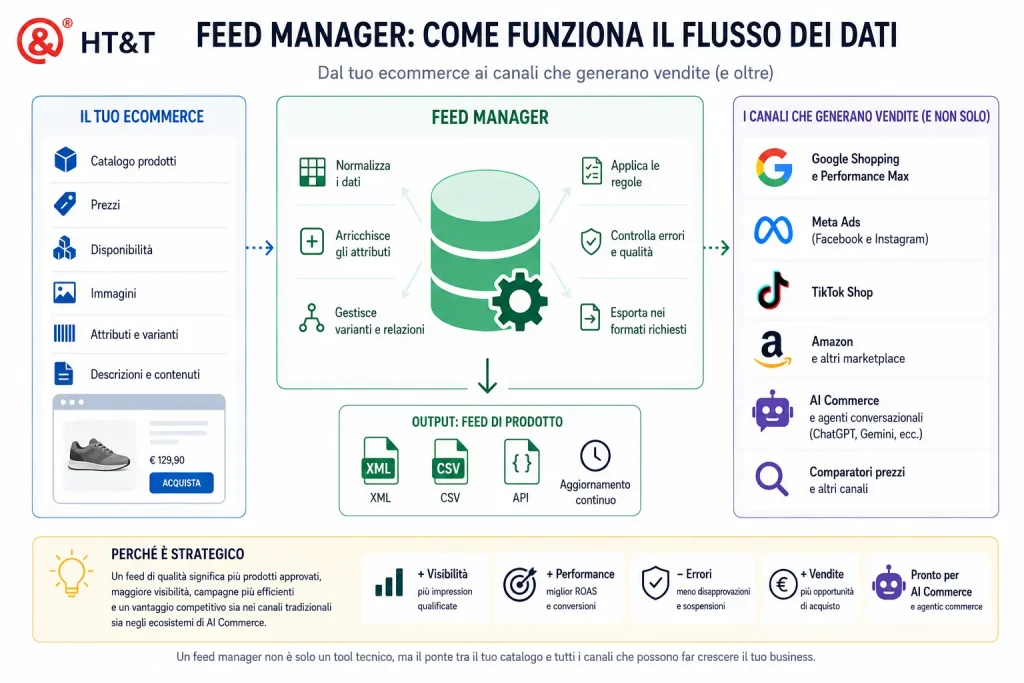
An ecommerce feed manager is used to automatically create, optimize and update the product feed, the dataset that describes products and makes them available to Google Shopping, Performance Max, Meta Catalog, TikTok Shop, marketplaces and emerging AI commerce systems.
The product feed contains information such as title, description, price, availability, images, GTIN, categories, variants, attributes, shipping rules and commercial data. If this information is incomplete or inconsistent, products may be disapproved, shown less frequently or excluded from campaigns. When the data is accurate and up to date, it improves visibility, relevance, ROAS and overall campaign quality.
The choice is not always between a plugin and an external feed manager. In many cases, especially with complex catalogs, ERP systems, PIM platforms, B2B price lists, international markets or marketplace-specific requirements, a custom-built feed may be necessary. This is why feed management is not just a technical task but a strategic product data activity.
This guide includes the latest Google Merchant Center specifications, the impact of Performance Max on product feeds, TikTok Shop requirements in Italy, and the emerging role of product feeds in agentic commerce through UCP, ACP and AI-readable catalogs.
Product Feed: The Numbers
What Is a Feed Manager and Why Is It Essential for Ecommerce?
A feed manager is a SaaS platform or plugin that automates the generation, transformation and distribution of product feeds across sales and advertising channels. Its job is to take product data from an ecommerce catalog (Shopify, Magento, WooCommerce, Prestashop) and deliver it in the correct format and at the required frequency for each destination. Beyond traditional advertising channels, product feeds are increasingly becoming a data source for recommendation systems, conversational search and AI-assisted commerce.
Without a feed manager, managing multiple channels means maintaining separate files for Google, Meta, TikTok, Amazon, Idealo, Trovaprezzi and others, updating them manually whenever a price, stock level or product changes. With catalogs containing hundreds or thousands of SKUs, this becomes impossible without errors. And every feed error results in products not being shown, wasted advertising spend or account suspensions.
“Merchants should submit the most robust product data possible to increase discoverability. Merchant Center feeds are the backbone that powers both organic and ads experiences across Google.”
Product feeds no longer power only advertising campaigns and commercial catalogs. They are gradually becoming the data layer that allows search engines, marketplaces and AI agents to understand product catalogs and help users throughout the buying journey.
Since 2023, with the expansion of Performance Max, the feed has become the engine behind almost all product advertising on Google: Search, Display, YouTube, Gmail and Discover. The same is true for Meta Dynamic Ads and TikTok Shopping Ads. Any ecommerce business managing a significant catalog without a structured feed manager is leaving performance on the table every day.
Most ecommerce businesses have a product data problem.
Improving the feed often generates better results than increasing advertising budgets.
Sandro Caneschi, CTO of HT&T Consulting
Product Feed Attributes: What Is Mandatory and What Makes the Difference?
Every platform has its own specifications, but there is a common set of attributes that determines feed quality, approval and performance across all major channels. The key distinction is between mandatory attributes, without which products cannot be approved, and optional attributes that directly influence competitiveness in auctions.
Practical rule: treat every optional attribute as mandatory. Google itself states that the more complete a feed is, the more products qualify for auctions and the more accurately they match user search queries.
Key Product Feed Attributes: Mandatory vs High-Impact Optional Fields
| Attribute | Status | Performance Impact | Common Mistake |
|---|---|---|---|
| id | Required | Unique identifier: foundation for attribution and reporting | IDs changing with every export (breaking historical continuity) |
| title | Required | Very high: determines matching with search queries | Titles copied from the website and not optimized for search |
| description | Required | Medium: used by Google for semantic matching | Generic descriptions or descriptions truncated at 70 characters |
| price | Required | Very high: mismatches with landing pages lead to disapprovals | Feed price different from the page price (VAT, discounts) |
| availability | Required | High: unavailable products marked as “in_stock” can trigger suspensions | Feed updated every 24 hours while inventory changes hourly |
| gtin | Strongly recommended | High: products without GTIN have limited performance | Missing or incorrect GTINs (5.53% of rejected products are due to invalid GTINs) |
| image_link | Required | Very high: the first thing users see | Images with watermarks, low resolution or non-white backgrounds |
| google_product_category | Strongly recommended | High: inaccurate categories reduce auction relevance | Categories that are too generic (e.g. “Clothing” instead of “Clothing > Women > T-Shirts”) |
| custom_label | Optional | Strategic: enables segmentation by margin, seasonality and priority | Not used, resulting in loss of granular control over budgets and bidding |
| sale_price | Optional | High: Google can display the crossed-out price, improving CTR | Not populated during promotions, reducing visibility |
| shipping, return_policy, product_detail | Strategic for AI commerce | High: helps AI agents and advanced comparison engines answer questions about delivery, returns, materials, compatibility and use cases | Information exists on the page but is missing from the feed or not structured |
Google Merchant Center and Google Shopping: How Does the Feed Work?
Google Merchant Center is Google’s platform for receiving, validating and distributing product feeds across all Google commerce surfaces: Shopping tab, Search, Images, YouTube, Display and Discover. Since 2024, Merchant Center Next has unified the interface and introduced new diagnostics and automatic data enrichment features.
The process works as follows: the feed manager generates the file (XML or CSV) or establishes an API connection; Merchant Center imports it according to the configured schedule, validates each attribute and approves or disapproves every product. Approved products enter Shopping and Performance Max auctions. Disapproved products are not shown and generate no revenue.
Google Merchant Center Updates You Should Know
Google introduced several specification changes in 2025 that directly impact existing feeds. The most relevant are:
- Installment pricing: a new sub-attribute for mandatory down payments; feeds must now show the total cost, not just the monthly installment
- Regional Availability and Pricing (RAP): improved support for regional pricing and availability, especially relevant for retailers with local warehouses
- VAT in EU countries: EU regulations require feed prices and landing page prices to include VAT; mismatches trigger automatic disapprovals
- Stricter image quality requirements: Google has increased minimum resolution requirements and now uses AI to detect low-quality images or text overlays
- Real-time price verification: Google crawlers check feed prices against landing page prices more frequently; even temporary discrepancies can trigger preemptive disapprovals (PID)
To better understand how purchase event tracking supports data quality sent to Google, it is worth reading the guide on
GA4 for Ecommerce: Event Tracking, Conversions and the Data That Matters
,
because feeds and tracking must be aligned to ensure accurate attribution.
Performance Max and Product Feeds: Why Catalog Quality Matters Even More
With Performance Max, Google has shifted control from advertisers to algorithms. PMax campaigns use the feed as their primary input to determine which products to show, on which surfaces, to which users and with which automatically generated creatives. This means that a low-quality feed not only creates disapproved products but also causes Performance Max campaigns to optimize based on poor data.
Custom labels become the primary tool for maintaining granular control within Performance Max. They allow catalog segmentation based on margin, seasonality, strategic priority or inventory levels, making it possible to assign different budgets and target ROAS values to each segment.
Product feed optimization directly affects ad eligibility, auction competitiveness and conversion efficiency.
For ecommerce businesses running Google Ads campaigns, the relationship between feed quality and Performance Max is explored in greater depth in the guide:
Google Ads for Ecommerce: Shopping and Performance Max
.
How to Use Custom Labels Strategically
Custom labels (0 to 4) are free-form attributes that you can populate however you like. Below are some of the most effective use cases we frequently implement for retail clients:
- custom_label_0 — Margin: high / medium / low. Allows different ROAS targets based on profitability levels
- custom_label_1 — Seasonality: evergreen / seasonal / promotion. Useful for pushing products at the right time
- custom_label_2 — Best Seller: top_seller / long_tail / new. Helps concentrate budget on products with the highest conversion potential
- custom_label_3 — Inventory: >100 / 10-100 / <10. Prevents spending on products close to running out of stock
- custom_label_4 — Price Range: premium / mid_range / entry_level. Enables different strategies for different pricing segments
Feeds, UCP and ACP: Preparing Ecommerce for Agentic Commerce
A product feed is no longer just a file for Google Shopping, Meta Ads or TikTok. It is becoming the data foundation that allows AI agents to understand catalogs, compare products, verify availability, build shopping carts and guide users through the purchasing process.
This evolution changes the role of the feed manager. It is no longer enough to publish products across advertising channels; the catalog must become understandable, queryable and reliable for emerging AI commerce systems such as ChatGPT Shopping, Google AI Mode and the new agentic commerce protocols.
For ecommerce businesses, this means that attributes such as price, availability, variants, images, GTINs, return policies, delivery times, sizes, compatibility, materials and use cases are no longer secondary details. They are signals that allow AI agents to answer questions such as:
- “What is the best product under €100?“
- “Is it available in my size and can it be delivered by Friday?“
- “Which variant is best suited as a gift?“
- “Can I return it for free?“
- “Which accessories are compatible with this product?“
From Advertising Feed to AI Agent Feed
| Layer | Traditional Feed | Agentic Commerce Feed |
|---|---|---|
| Goal | Display products in Shopping campaigns and catalog ads | Enable AI agents to understand, compare and recommend products |
| Core Data | Title, price, image, availability, URL | Core data plus variants, policies, shipping, returns, compatibility and use cases |
| Update Frequency | Periodic updates every 4–24 hours | Near real-time updates for pricing, stock and availability |
| Optimization Logic | Optimized for search queries and advertising auctions | Optimized for answers, recommendations and task completion |
| Content | Short descriptions tailored to channels | Structured descriptions, product FAQs, semantic attributes and contextual usage information |
The direction is clear: ecommerce businesses with cleaner, richer and more frequently updated catalogs will be easier to interpret not only for advertising algorithms but also for AI agents that will increasingly influence product discovery, comparison and purchasing decisions.
Meta Catalog: Product Feeds for Facebook and Instagram
The Meta Catalog is the equivalent of Google Merchant Center within the Meta ecosystem. It powers Dynamic Ads (Advantage+ Catalog Ads), Instagram collections, product tags in Stories and Reels. The quality of a Meta catalog directly impacts the effectiveness of Advantage+ Shopping campaigns, which are currently the preferred product advertising format on Meta.
Meta feeds can be delivered via URL (automatic import), through pixel events (for Shopify and WooCommerce catalogs) or via Partner Integrations. Core requirements are similar to Google’s (ID, title, price, availability, image, URL), but Meta also imposes specific requirements regarding image formats (1:1 for Dynamic Ads), currencies and localized languages.
To understand how product feeds integrate with a broader Meta advertising strategy, read our guide on
Meta Ads B2B: How to Generate Leads on Facebook and Instagram
,
with particular attention to how catalog data and conversion signals reinforce each other.
TikTok Shop and Product Feeds: What Changes in Italy
TikTok Shop launched in Italy in April 2025 and introduced a new social commerce model in which product feeds no longer support only advertising campaigns, but the entire purchasing experience directly inside the app — including in-feed videos with product tags, live shopping and profile storefronts. For brands that want to invest in this channel, the feed becomes the essential starting point.
The TikTok Catalog requires a partially different set of attributes compared to Google and Meta: title (up to 255 characters), description, price, images (minimum 800x800px), product page URL, TikTok category, availability and, for TikTok Shop, logistics information such as weight, dimensions and shipping details.
A feed manager already configured for Google and Meta can often be adapted to generate TikTok feeds as well, transforming titles, categories and attributes according to TikTok’s requirements. This avoids maintaining separate data sources and reduces inconsistencies between channels.
To learn more about TikTok Shop opportunities for Italian brands, read:
TikTok Shop Italy: How It Works for Buyers, Sellers and Brands
.
Common Product Feed Mistakes and How to Fix Them
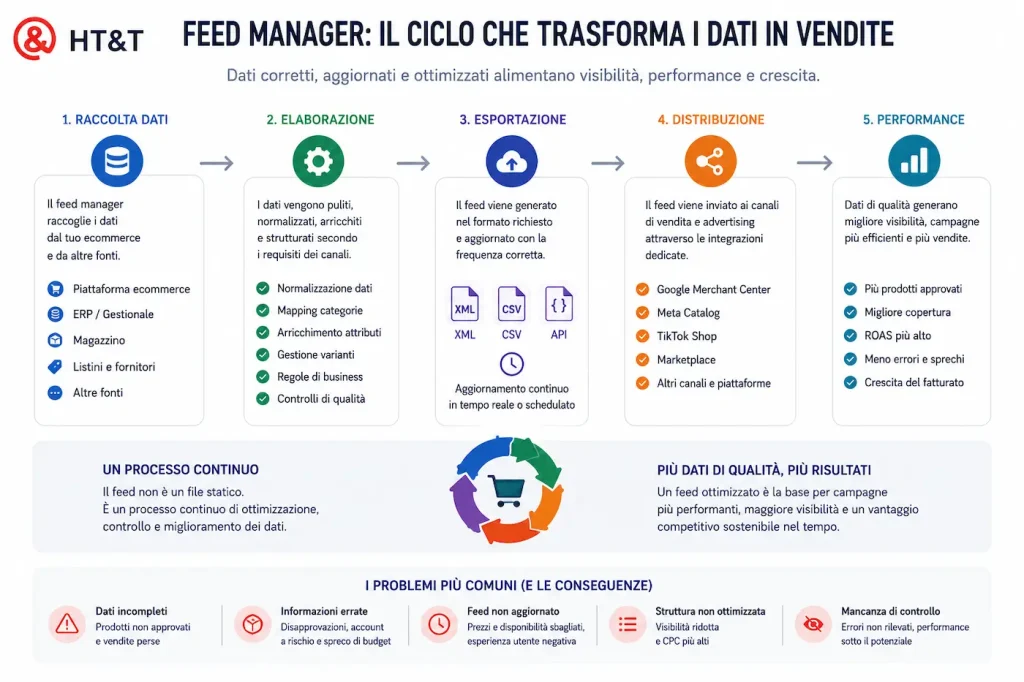
According to Google Merchant Center data, product disapprovals increase by 340% during peak sales periods. Not because merchants suddenly reduce feed quality, but because Google’s checks become stricter and price and availability changes dramatically increase the likelihood of mismatches. Businesses with healthy feeds operate smoothly through these periods. Businesses with fragile feeds often see campaigns stop precisely when traffic is at its highest.
Most Common Product Feed Errors and Corrective Actions
| Error | Symptom | Cause | Solution |
|---|---|---|---|
| Feed price / landing page mismatch | Preemptive disapproval (PID), products removed from auctions | Feed updated every 24 hours while prices change in the meantime; promotions not reflected in the feed | Increase feed refresh frequency to every 4–6 hours; implement real-time synchronization for flash promotions |
| Missing or invalid GTINs | Limited performance, fewer qualified auctions, lower CTR | GTINs missing from ERP systems; B2B products without standard EANs | Populate GTINs whenever available; for custom products use identifier_exists: false |
| Unoptimized titles | Low relevance to search queries, reduced impression share | Titles copied from the website and written for users rather than search engines | Rewrite titles using the structure: Brand + Product Type + Key Attributes + Variant |
| Outdated availability | Products marked as in stock but unavailable at purchase time | Daily feed updates versus real-time inventory changes | Implement supplemental inventory feeds updated hourly or via API |
| Categories too generic | Products shown in irrelevant contexts, higher CPC | Automatic mapping that lacks granularity; default category too high in the taxonomy tree | Manually map products to the most specific Google taxonomy categories possible |
| Low-quality images | Warnings in Merchant Center; below-average CTR | Small images, watermarks, non-white backgrounds or incorrect variant images | Perform image audits and add additional_image_link attributes with multiple product views |
| Unused custom labels | Inability to segment by margin, seasonality or priority | Basic feed without business logic applied | Define a custom label taxonomy and apply it through feed manager rules |
How to Optimize Product Feed Titles and Descriptions
The title is the attribute with the greatest impact on feed relevance. Google uses titles to determine which search queries a product is eligible to appear for. A title designed for a website (“Summer Sneaker 2026”) and a title designed for a feed (“Nike Air Max 270 Men’s White Size 42 – Running Sneaker”) have completely different visibility potential.
Recommended Structure for Feed Titles
The ideal structure varies by category, but the principle remains the same: place the most discriminating information first.
- Fashion and apparel: Brand + Product Type + Gender + Color + Size
Example: “Levi’s 501 Men’s Dark Blue Jeans W32 L32” - Electronics: Brand + Model + Key Specifications + Color/Storage
Example: “Apple iPhone 15 Pro 256GB Natural Titanium” - Home and furniture: Product Type + Brand + Material + Dimensions + Color
Example: “IKEA KIVIK 3-Seater Sofa Light Gray Fabric 228cm” - Sports and outdoor: Brand + Product Type + Activity + Gender + Variant
Example: “Salomon XT-6 Men’s Trail Running Shoes Green/Black” - B2B / Industrial: Product Type + Brand + Product Code + Technical Specifications
Example: “DN25 1” Brass Ball Valve PN16 with Lever”
Feed title optimization is an ongoing process, not a one-time configuration. Search behavior changes, seasons change and competitors change. Reviewing top-performing and low-CTR titles at least quarterly is the minimum recommended practice.
Feed Managers and Tools: How to Choose the Right One
The feed management market is crowded. The right choice depends on the number of SKUs, the number of channels, the ecommerce platform, transformation requirements, budget and internal resources. The best solution is the one that fits your specific business needs.
For simple catalogs, native plugins or SaaS feed managers may be sufficient. However, as channels, languages, currencies, pricing rules, B2B catalogs and ERP/PIM integrations increase, feed management becomes more complex. In these cases, a custom-built feed may be the most effective approach.
Leading Feed Managers Compared
| Tool | Best For | Strength | Limitation |
|---|---|---|---|
| Channable | Medium and large ecommerce businesses, European multichannel projects | Powerful transformation rules, broad channel coverage, strong support | Higher cost than basic solutions; learning curve |
| DataFeedWatch | Ecommerce businesses focused on Google and Meta with medium-sized catalogs | Guided title optimization, excellent Shopify integration, intuitive interface | Less flexible than Channable for advanced transformations |
| Feedonomics | Enterprise retailers and omnichannel operations | Full-service management and advanced marketplace support | High cost, less suitable for SMBs |
| Native Plugins (Shopify / WooCommerce) | Small catalogs, single-channel strategies | Easy setup, no platform fees | Limited transformations and weak multichannel capabilities |
| Custom Feed Development | Ecommerce projects with ERP/PIM integrations, advanced rules, multilingual feeds or international markets | Maximum flexibility for pricing, categories, attributes, marketplaces and advertising channels | Requires technical expertise, maintenance and ongoing monitoring |
When a Custom Feed Is the Right Choice
A plugin or third-party feed manager is not always the best solution. For simple catalogs with limited channels, they can be efficient and cost-effective. But as ecommerce operations grow, complexity increases: ERP systems, inventory management, country-specific pricing, B2B catalogs, advanced variants and marketplace-specific requirements all create new challenges.
In these cases, a custom feed enables a data flow designed around the actual needs of the business rather than the limitations of a standard tool. Feeds can be generated in XML, CSV, JSON or API formats and include custom logic for categories, availability, pricing, images, languages, currencies, promotions and prioritization.
Plugin vs Custom Feed: How to Choose
| Scenario | Recommended Solution | Reason |
|---|---|---|
| Small catalog, few SKUs, Google Merchant Center only | Native plugin or basic feed manager | Quick setup, low cost and limited complexity |
| Medium-sized catalog, multiple advertising channels, standard optimization rules | SaaS feed manager | Good balance between automation, channel management and operational control |
| Large catalog, multiple languages, currencies and countries | Advanced feed manager or custom feed | Greater control over mapping, localization, pricing and availability |
| ERP, PIM, multi-warehouse or B2B price list integrations | Custom feed development | Data must be aggregated, normalized and transformed according to specific business logic |
| Marketplaces with special requirements or non-standard formats | Custom feed | Allows compliance with channel-specific structures, attributes and validation rules |
| AI commerce projects, AI agents or API-accessible catalogs | Custom feed or dedicated API integration | Requires richer, continuously updated and easily queryable product data |
The right decision is therefore not simply “plugin or custom development”. It depends on data quality, catalog complexity, target channels and the level of control required. In many projects, the best solution is hybrid: a feed manager for standard channels and custom feeds for strategic or highly specific workflows.
When evaluating a feed manager, growing importance should also be given to the ability to export structured data, support API integrations and adapt to the new conversational and agentic commerce protocols emerging across the ecommerce ecosystem.
For Shopify merchants, the starting point for tracking product events and connecting feeds to conversions is our guide on
Shopify Custom Pixel.
The feed brings users to products; tracking tells you whether they purchased.
When catalogs grow and feed managers need to integrate with ERP systems, PIM platforms or advanced automation workflows, it can be useful to complement them with orchestration tools such as those discussed in our guide on
Business Process Automation with n8n.
Conclusion: Product Feeds Are a Strategic Asset, Not a Technical File
Many ecommerce businesses still view the product feed as a simple export file required for Google Shopping or Meta Ads. In reality, it is one of the most valuable assets within the entire digital ecosystem.
Every feed error can result in products not being displayed, less efficient campaigns, higher advertising costs and lost sales opportunities. Conversely, a complete, accurate and regularly updated feed improves catalog visibility, increases signal quality and allows businesses to extract more value from their media investments.
The evolution of advertising platforms and the rise of AI-assisted purchasing experiences are further expanding the role of product feeds. They are no longer just the engine behind Google Shopping, Meta Catalog or TikTok Shop. They are becoming the information layer that enables search engines, marketplaces and AI agents to understand products, variants, availability and commercial conditions.
For this reason, feed management should not be treated as a technical task performed once a year. It should be viewed as an ongoing process of catalog, data and performance optimization.
If you want to understand how competitive your catalog really is and identify opportunities to increase visibility across Google, Meta, TikTok, marketplaces and emerging AI ecosystems, the first step is a comprehensive feed and product data audit. From there, you can determine whether a third-party feed manager, optimization of existing tools or a custom-built feed is the right solution for your ecommerce business.
Frequently Asked Questions About Feed Managers and Product Feeds
What is a product feed in simple terms?
A product feed is a file, in XML, CSV or API format, that contains all your product data: title, price, availability, image, category and GTIN. Advertising platforms such as Google, Meta and TikTok use this data to display product listings to users.
What is the difference between a feed manager and Google Merchant Center?
Google Merchant Center is the destination: it receives, validates and distributes your feed to Shopping and Performance Max campaigns. A feed manager is the tool that creates, optimizes and updates the feed before sending it to Merchant Center and other channels.
How often should a product feed be updated?
For most ecommerce businesses, updating prices and availability every 4–6 hours is the minimum recommended frequency. For flash promotions or volatile stock levels, real-time updates via API or supplemental feeds may be required.
Can I use the same feed for Google, Meta and TikTok?
No. You can start from the same catalog, but the feed must be adapted to each platform. Google, Meta and TikTok have different requirements for attributes, categories, images and formatting.
What happens if my products are disapproved in Google Merchant Center?
Disapproved products are not shown in Shopping or Performance Max campaigns. They generate no impressions, clicks or conversions. If too many products are disapproved, the entire Merchant Center account may also be at risk.
Is GTIN mandatory for all products?
No, but it is strongly recommended when available. Products without GTIN may have limited performance in Google Shopping. For custom, handmade or non-standard products, the attribute identifier_exists: false can be used.
How does an optimized feed improve Performance Max campaigns?
Performance Max uses the feed as a primary input to decide which products to show and where. Optimized titles, precise categories and structured custom labels help Google match products to more relevant queries and improve overall ROAS.
How much does a professional feed manager cost?
Costs vary depending on catalog size and number of channels. SaaS solutions may start from around €50–100 per month for small catalogs and reach €500–2,000 per month for larger, multichannel projects.
What are custom labels and how are they used?
Custom labels are free-form attributes in the product feed. They are used to segment products by margin, seasonality, stock level, commercial priority or price range, making campaign management more granular.
Does a B2B ecommerce business need a feed manager?
Yes, if it uses Google Shopping or product campaigns. B2B catalogs often involve internal product codes, variable pricing, customer-specific conditions and multiple warehouses, which make structured feed management even more important.
Are product feeds useful for ChatGPT, Gemini and AI agents?
Yes. Product feeds are becoming a data foundation for agentic commerce. Systems such as ChatGPT Shopping, Google AI Mode and protocols like ACP and UCP require structured, updated and attribute-rich catalogs to understand, compare and recommend products reliably.
Checklist: Product Feed Audit in 10 Points
Before optimizing Shopping or Performance Max campaigns, check these feed elements:
- All products have unique and stable IDs over time
- Titles follow the structure Brand + Product Type + Key Attributes and are not copied directly from the website
- The feed price matches the landing page price, including VAT where required
- Availability is updated at least every 4–6 hours
- GTINs are populated where available; for products without GTIN,
identifier_exists: falseis set - Google categories are mapped as specifically as possible
- Images meet the requirements: minimum 800x800px, no watermarks, no low-quality assets
- Custom labels are populated with business logic such as margin, seasonality or priority
- Google Merchant Center diagnostics show no unresolved disapprovals or warnings
- There is a monthly feed review process for titles, categories and attributes
Sources and References
-
Google Merchant Center Help
Official specifications for product feed attributes, disapproval requirements and updates.
-
Google Product Data Specification
Complete technical documentation on feed attributes, accepted formats and best practices.
-
Productsup — Feed Disapprovals 2026
Analysis of the most common Google Merchant Center disapproval reasons and their impact on campaigns.
-
Meta Business Help — Catalogs
Official documentation on Meta Catalog, required attributes and Dynamic Ads.
-
TikTok for Business — Product Feed
Product catalog requirements for TikTok Shop and TikTok Shopping Ads.
-
HT&T Magazine — Google Ads for Ecommerce
How product feeds power Performance Max and Shopping campaigns in Google Ads.
Continua a leggere
22 minutes of reading

14 minutes of reading

10 minutes of reading

And it consumes less energy.
To return to the page you were visiting, simply click or scroll.