Business Password Manager: 1Password vs Bitwarden

Cybersecurity & access management
Business password manager: why it matters and how to choose between 1Password, Bitwarden and Vaultwarden
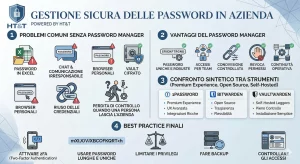
A business password manager is not just about keeping passwords organized, but about reducing operational risk, avoiding credentials saved in browsers, chats or Excel files, ensuring continuity when someone changes role or leaves the company, and introducing clear rules about who can access what. We are not simply talking about having all passwords in one place, but about storing them in an encrypted vault, with permissions, traceability and controlled sharing.

Why does a business password manager matter?
In many companies, the problem is not a single weak password but the sum of bad habits: credentials shared on WhatsApp, logins left in a personal browser, Excel files with usernames and passwords, social or advertising accounts kept in the memory of one key person, and administrative accounts known by too many employees.
As long as the system holds up, everything seems to work. Then an unexpected replacement, employee turnover, an account compromise or a simple loss of control is enough to turn a convenient habit into a major risk for the company and the entire business.
A business password manager does exactly this: it turns access management from an informal habit into a governed process. It means generating strong and unique passwords, storing them in encrypted form, sharing them only with those who need them, and revoking access in an orderly way when responsibilities change.
So we are not only talking about a technical issue, but above all about business continuity, governance and organizational maturity.
Data and statistics that show why this is a real issue
The topic of business password managers is not driven by hype, but by a very real operational and security issue. According to the 2025 Verizon Data Breach Investigations Report, the use of compromised credentials was the initial vector in 22% of the data breaches analyzed. In the same report, Verizon also found that credential stuffing accounts for a median of 19% of all daily authentication attempts, with peaks of 25% in enterprise companies. Verizon also highlights that, in the observed cases of users affected by infostealers, only 49% of passwords were actually different from one service to another, showing how common password reuse still is.
The 2025 IBM X-Force Threat Intelligence Index also confirms how central the identity and access issue has become: IBM reports an 84% increase in the weekly number of infostealers distributed through phishing, notes that identity-based attacks account for 30% of all intrusions, and observes that nearly one in three attacks uses valid accounts. In other words, the risk is not just “getting into systems,” but doing so by using real credentials that have been stolen or reused.
From an organizational point of view, data from the 1Password Annual Report 2024 also helps explain the issue from the perspective of internal habits: in the sample analyzed, 34% of workers said they use apps, tools or devices that are not approved by IT, while 69% of cybersecurity professionals believe that SSO alone is not enough to truly protect access. It is in this gap, between technical risk and operational disorder, that a business password manager becomes a governance tool and not just a storage tool.
What it means to keep passwords in one place
“Keeping all passwords in one place” may sound dangerous. In reality, it only becomes dangerous when that place is a shared file, a note, a cloud document or an internal chat.
When that single place is instead an encrypted vault, protected by strong authentication, segmented by team and governed by precise access rules, centralization does not increase risk, it reduces it.
The practical advantage is that access no longer depends on individual memory. It remains available to the organization in a controlled way. One department can only see its own access, IT can manage infrastructure credentials, marketing can manage campaign, social and analytics access, and administration can manage its own tools. When done properly, centralization does not mean unrestricted access: it means order.
The point is not to save all passwords together, but to move them from improvised locations into a system designed to store, share and revoke them securely.
1Password vs Bitwarden: two mature approaches, two different philosophies
1Password and Bitwarden are both mature products. Both allow credentials to be stored in encrypted vaults, operate under a zero-knowledge model, support multiple devices and introduce controlled sharing mechanisms. The difference is not the save password feature, but the model through which a company chooses to buy simplicity, control and flexibility.
Comparative table on model, strengths, limitations and ideal scenarios for 1Password, Bitwarden and Vaultwarden.
| Solution | Model | Main strength | Point of attention | Ideal scenario |
|---|---|---|---|---|
| 1Password | Proprietary software, managed service | Highly polished user experience, easy adoption, mature enterprise management | Less infrastructure flexibility compared with a self-hosted approach | Companies looking for a premium solution that is ready to deploy and easy to adopt |
| Bitwarden | Open source, cloud or official self-hosting | Transparency, flexibility, strong balance between cost and features | Requires a more careful evaluation of the deployment model | Companies that want open source and an official on-premise path as well |
| Vaultwarden | Independent open source project compatible with Bitwarden clients | Lightweight, efficient and highly appealing for self-hosted scenarios | It is not the official Bitwarden server and requires greater technical oversight | Organizations with system administration skills that want control and a reduced footprint |
1Password: the premium, turnkey choice
1Password is often the most suitable solution when the goal is to simplify internal adoption. The interface is highly polished, the vault logic is intuitive, distribution across devices is mature, and the product is designed to reduce friction for non-technical teams.
A distinctive element is the Secret Key, which works alongside the account password and further strengthens vault protection. That is why 1Password is often perceived as a premium solution: less infrastructure freedom, but strong experience quality and great attention to ease of use.
Bitwarden: open source, flexible and closer to control-oriented needs
Bitwarden is often the preferred choice for those who want a transparent, open source platform with a very compelling balance of cost, features and architectural freedom.
For business use, the value is not limited to the personal vault, but also includes Organizations, Collections and controlled sharing of items. This allows credentials to be assigned to teams and groups without resorting to improvised solutions. In addition, Bitwarden also provides an official self-hosting option, which is useful when a company wants greater data sovereignty.
What is Vaultwarden and when does it make sense?
Vaultwarden deserves an important clarification. It is not the official Bitwarden server. It is an independent project, written in Rust, compatible with Bitwarden clients and highly appreciated in self-hosted environments where a lighter solution is preferred.
This point needs to be stated precisely: choosing Vaultwarden does not mean using Bitwarden for free in the strict sense. It means choosing an alternative, unofficial implementation that can be very efficient but also requires greater internal technical responsibility.
For a structured company, Vaultwarden can make sense when three conditions are met.
- a real intention to keep data, backups and infrastructure control in-house.
- the presence of technical skills capable of handling updates, hardening, backups, monitoring and operational continuity.
- the awareness that, precisely because the project is unofficial, it must be adopted with a higher level of oversight than a vendor-managed solution.
How to choose the right solution for the company
Which is better, 1Password or Bitwarden? It depends on how much control we want to keep in-house and how much complexity we are willing to manage.
If the company is looking for a ready-to-use, elegant solution with a low adoption barrier and strong perceived quality, 1Password is a very solid choice.
If, instead, the selection criteria include open source, flexibility, official self-hosting and a strong balance between cost and features, Bitwarden is often a very convincing middle ground.
If the goal is to maximize infrastructure control with a lightweight platform, and real internal technical oversight is available, Vaultwarden can be considered. But it is a choice that should be treated as an IT project, not as a simple tool installation.
In all cases, the real turning point is not the software name. It is the adoption of a clear policy around access, roles, onboarding, offboarding, credential sharing and permission revocation.
Additional features that are useful in business
In addition to storing credentials in an encrypted vault, tools such as 1Password, Bitwarden and, in self-hosted environments, Vaultwarden, offer very practical features that improve day-to-day work. The first is automatic generation of secure passwords: instead of inventing weak or reused credentials, users can create long, random and unique passwords directly within the software, reducing one of the most common mistakes in access management. Since memorization is no longer a problem, generating strong and complex passwords becomes a major step forward in system security. 1Password provides its password generator in apps and browser extensions, while Bitwarden offers a password and username generator in its applications and in the browser. Vaultwarden, being compatible with official Bitwarden clients, effectively inherits this same user-side workflow.
The second very useful feature is the secure sharing of credentials or sensitive information through temporary links, which is a much more appropriate alternative to sending passwords in plain text via email or chat. In 1Password, it is possible to share an item through a link, choose who can view it, set an expiration date and, in business settings, even limit access to a single view. Bitwarden offers a dedicated feature called Bitwarden Send, which allows text or files to be shared through a protected link, with an expiration date, deletion date, an optional password and even a maximum number of views. Vaultwarden also supports Send, making a very similar controlled-sharing mechanism available in self-hosted setups as well.
In business, these features make a difference because they reduce reliance on fragile and risky practices, such as passwords sent by email, temporary files or forwarded messages without control. Once again, this is not just about having a place to store passwords, but about introducing tools that make it easier to work properly and harder to make mistakes.
Important note: whenever possible, in addition to using unique and strong passwords, it is always advisable to enable two-factor authentication (2FA) or two-step verification. This way, even if a credential is compromised, there is still an additional layer of protection before someone can access the account.
HT&T Consulting’s choice
At HT&T, we chose to adopt Vaultwarden in a self-hosted setup, hosted on a low-cost dedicated server, but designed according to clear criteria of reliability, control and sustainability. The goal was not to save money at all costs, but to build a solution proportional to our operational needs and consistent with a structured approach to security management.
In this scenario, access management is not an isolated issue: it is directly connected to systems administration and information infrastructure, meaning the set of servers, networks, communication systems, backups and technical controls that make a self-hosted platform truly reliable.
In fact, the credentials reside on infrastructure directly managed by us, with daily backups, limited access, a restrictive configuration and a setup designed to reduce the attack surface. In this way, we have centralized the management of company passwords while maintaining a strong level of autonomy, data control and operational continuity.
This choice is consistent with a structured approach to information security, access control and the principle of least privilege, in line with the governance path that HT&T also declares through its ISO/IEC 27001 certification.
For us, this represents a concrete balance between data sovereignty, ease of use, economic sustainability and technical control. It is not a universal solution for every company, but in our case it proved to be aligned with our internal structure, available skills and the desire to directly govern a critical asset such as digital access.
A business password manager is not just about storing credentials: it is about turning access into a governed, shareable and revocable process.
Sandro Caneschi, CTO and COO at HT&T
Conclusion
Today, using a business password manager is no longer an optional choice reserved for large organizations, but a concrete measure for security, order and operational continuity.
Company credentials already exist. The difference lies in deciding whether to leave them scattered across people, browsers, documents and messages, or to bring them into a system designed to store and share them in a controlled and secure way.
1Password, Bitwarden and Vaultwarden answer different needs. The core point, however, remains the same: stop treating access as an individual habit and start governing it as a critical organizational asset.
For italian companies evaluating broader initiatives around cloud, security and digital infrastructure, it may also be useful to explore the topic of the Cloud and Cybersecurity Voucher 2026, which opens up a broader scope than password management alone.
Frequently asked questions
Is it safe to keep all company passwords in one place?
Yes, if that place is an encrypted vault with permissions, strong authentication and clear access rules. No, if it is a shared file, an email, a note or an Excel sheet.
1Password or Bitwarden: which is the better option for a business?
It depends on the operating model. 1Password is often easier to adopt and very polished from a user-experience perspective. Bitwarden offers more transparency, open source and an official path for self-hosting as well.
Is Vaultwarden the same as Bitwarden?
No. Vaultwarden is an independent and unofficial project that is compatible with Bitwarden clients. It can be very interesting in self-hosted environments, but it should be chosen with full awareness of the greater technical oversight it requires.
When does self-hosting make sense?
It makes sense when the company wants greater data sovereignty, has the internal skills needed to manage the platform, and considers the password manager part of its critical infrastructure rather than just a SaaS service.
Is a password manager better than saving passwords in the browser?
In a business context, yes. A browser can be convenient for personal use, but it is not designed to govern shared credentials, roles, permissions, revocations and operational continuity. A business password manager, on the other hand, provides separate vaults, controlled sharing and a more orderly way to manage access.
Is it a good idea to keep using Excel or shared documents for passwords?
No. Excel files, cloud documents, shared notes or internal chats are not tools designed to store sensitive credentials. They often lack proper segmentation, access control, traceability and secure sharing management. They may seem practical, but they increase operational risk.
What happens when someone leaves the company?
This is one of the main advantages of a business password manager: access remains under the organization’s control. When an employee changes role or leaves the company, permissions can be revoked, shared credentials can be updated and continuity can be maintained without losing access to critical systems. A password manager is also useful when roles change internally: for example, one person may previously have had access to a client’s tools and credentials, and after a role change those accesses can be reassigned. Before, they had access to the password group associated with client X; afterward, they can be given access to the group associated with client Y.
Is a password manager still useful if the company already uses SSO?
Yes, often it is. SSO helps simplify and strengthen access to many services, but it does not always cover the entire company perimeter. Technical accounts, legacy access, shared credentials, social accounts, test environments or tools used by specific teams often remain outside its scope. That is why a password manager and SSO do not exclude each other: they complement each other.
If I forget the master password, do I risk losing everything?
It depends on the solution adopted and on how internal management has been configured. That is why, in a business context, it is important to define clear recovery, onboarding and system administration procedures. A good project is not limited to installing the software, but also includes operating rules to prevent a single mistake from blocking access to information.
Bibliography
CISA — Use Strong Passwords
CISA recommends long, random and unique passwords, supported by a password manager.
NIST SP 800-63B
NIST states that systems should allow the use of password managers and autofill.
1Password — Teams & Small Business
Official documentation on zero-knowledge, AES-256 and Secret Key.
Bitwarden — Open Source
Official overview of open source, end-to-end encryption and zero-knowledge.
Bitwarden — Self-hosting and Organizations
Official documentation on self-hosting and sharing through Organizations and Collections.
Vaultwarden — Official project repository
GitHub repository of the project, which presents itself as a Bitwarden-compatible but unofficial server.
Continua a leggere
6 minutes of reading

21 minutes of reading

11 minutes of reading
And it consumes less energy.
To return to the page you were visiting, simply click or scroll.