
Performance Marketing & Ecommerce
Google Ads for ecommerce: strategy, Shopping and Performance Max in the AI era
Activating campaigns is not enough: you need to build a structure that captures the right demand, optimizes budget intelligently and produces reliable data for business decisions.
This is the difference between a Google Ads account that spends and one that generates profit.
In short
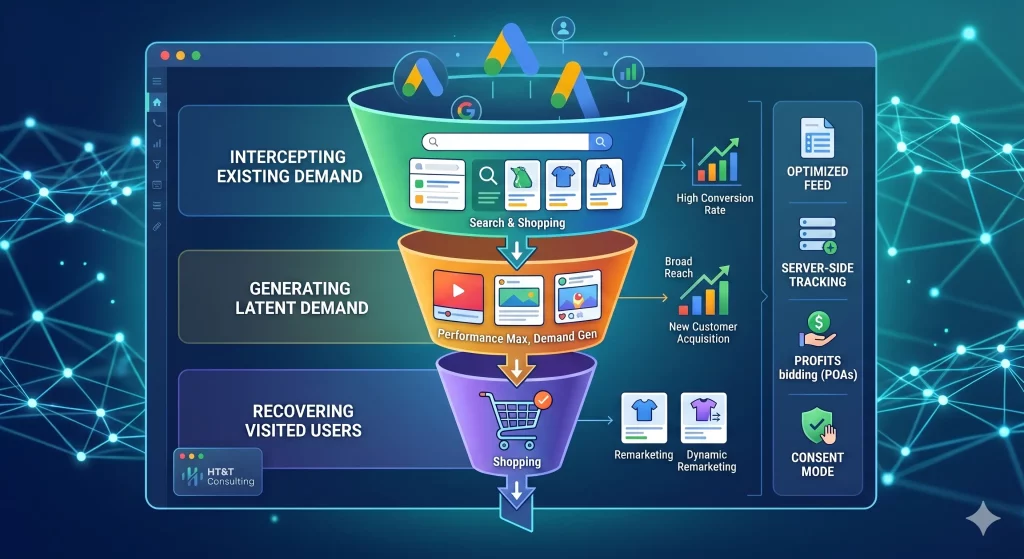
Google Ads for ecommerce works on three levels: capturing existing demand with Search and Shopping, generating latent demand with Performance Max and Display, and recovering users who have already visited the website with remarketing.
An effective strategy does not choose only one of these levels: it integrates them into a coherent system where each format works on the right part of the funnel, with budget allocated according to potential and conversions tracked reliably.
Google Ads ecommerce: the numbers
Why does account structure make the difference?
Most ecommerce businesses that analyze their Google Ads accounts find the same problem: campaigns that have been active for years, budget flowing, some conversions, but no clear view of what works, why it works and where improvement is possible.
Account structure is not a technical detail. It is the foundation for every decision: how budget is distributed, how Smart Bidding works, how data is interpreted, how successful campaigns are scaled and how wasted spend is stopped.
For an ecommerce business, the optimal structure is built on three levels: existing demand (Search + Shopping), latent demand (Performance Max, Display, YouTube) and recovery (dynamic remarketing).
Understanding which level to cover with which budget is the most important decision an ecommerce business can make for its campaigns.
“An ecommerce business that invests everything in Performance Max without having optimized Shopping is like building the roof before the foundations. The algorithm works better when it has a solid base to learn from.”
Google Shopping: feed, structure and optimization
Shopping campaigns are the core of Google Ads for ecommerce. They capture users who are actively searching for a product, show image, price and store name directly in the SERP, and convert at significantly higher rates than text ads for queries with explicit commercial intent.
But Shopping campaigns only work well if the product feed is high quality.
The feed is the engine: the richer, more accurate and better optimized it is, the more Google can show the right products to the right people at the right time.
Feed optimization: the fields that make the difference
Google Shopping feed fields and their importance
| Field | Importance | What to optimize |
|---|---|---|
title |
Critical | Include brand, model, variant and main keywords. Avoid generic titles such as “Men’s shoe”. |
description |
High | Use the first 160 characters for secondary keywords and the main product benefits. |
google_product_category |
High | Use Google’s taxonomy at the most specific level possible; do not stop at “Apparel”. |
custom_label |
High | Custom labels to segment campaigns by margin, seasonality, bestseller status and stock. |
image_link |
Critical | Images on a white or neutral background, product clearly visible, minimum resolution 800×800px. |
price |
Critical | It must exactly match the price on the product page; discrepancies cause disapprovals. |
availability |
High | Update in real time. Out-of-stock products appearing in campaigns burn budget without converting. |
gtin |
Medium | Required for products with an EAN/UPC code. It improves feed quality and ad ranking. |
How to structure Shopping campaigns
The recommended structure for an ecommerce business with a medium-to-large catalog involves segmenting campaigns by margin or commercial priority, not only by product category.
- High-priority campaign: bestsellers, high-margin products, current promotions
- Medium-priority campaign: standard catalog with good rotation
- Low-priority campaign: long tail, seasonal products, new arrivals
This structure allows different budgets to be allocated by commercial priority and gives Google Ads clearer signals about which products should be optimized more aggressively.
Performance Max: opportunities and limits for ecommerce
Performance Max is Google Ads’ most automated campaign format.
It automatically distributes ads across all Google channels (Search, Shopping, YouTube, Display, Gmail, Maps), using AI to optimize toward the conversion goal.
For an ecommerce business, it can be very effective, but only if managed with the right level of awareness.
To explore the evolution of automated campaigns further, you can also read our guide on Google AI Max for Shopping and Travel, where we analyze how artificial intelligence is entering Shopping and Travel campaigns as well.
“Performance Max is not a substitute for strategy, but an amplifier. If the base is weak (poor feed, inaccurate tracking, weak conversion signals), PMax amplifies the problems, not the results.”
When Performance Max works well
- Product feed optimized and updated in real time
- At least 30-50 conversions per month to provide the model with enough data
- Reliable tracking, preferably server-side
- High-quality creative assets (images, videos, headlines, descriptions)
- Clear conversion goals correctly configured in GA4
- New Customer Acquisition strategy: configure the specific objective to assign additional economic value to conversions generated by users who have never purchased on the website, allowing AI to prospect aggressively but with control.
The limits of Performance Max
Performance Max offers limited transparency: it is difficult to understand where ads are actually shown, which assets perform best and which queries generate conversions. This makes manual optimization almost impossible.
For most ecommerce businesses, the correct strategy is to use Performance Max alongside standard Shopping campaigns, not as a replacement.
Shopping manages explicit demand with more control; PMax explores new segments and channels where the algorithm can find latent demand.
Search Ads for ecommerce: when and how to use them?
Search campaigns in Google Ads for ecommerce make sense in three specific scenarios: branded queries (users searching for your store or brand name), high-intent category queries (“men’s running shoes offer”) and comparison queries (“price comparison X vs Y”).
Using Search for every product query is not efficient, because Google Shopping already captures that demand with richer ads and generally higher conversion rates.
Search becomes essential when you want precise control over the ad message or when you want to capture informational queries that Shopping cannot cover.
RSA: how to build ads that convert
Search ads in Google Ads use the RSA format, Responsive Search Ads, with up to 15 headlines and 4 descriptions that Google combines dynamically. Asset quality determines ad quality and Quality Score, which directly affects cost per click.
- Include the main keyword in at least 3 headlines
- Use headlines with different value propositions, such as price, shipping, guarantee and uniqueness
- Add at least one headline with an explicit CTA (“Buy now”, “Discover the collection”)
- Pin the most important headlines, but do not overdo it: too many pins limit algorithm flexibility
- Add all available assets: sitelinks, callouts, structured snippets, images and prices
Do not use broad match without active Smart Bidding and enough budget for machine learning. In small ecommerce accounts, broad match without control burns budget on irrelevant queries.
Demand Gen: creating demand on YouTube and Discover
If Search and Shopping capture users who are already searching, Demand Gen campaigns generate visual interest. Thanks to YouTube Shorts, Gmail and the Discover feed, this format is ideal for ecommerce businesses that rely heavily on product aesthetics or impulse purchases.
This approach is close to the logic of programmatic advertising: using data, signals and contexts to reach the user before they express an explicit demand.
Pro tip: Use Lookalike segments inside Demand Gen to find new users similar to those who have already purchased high-value products from your store.
Remarketing: recovering users who did not buy
Most users who visit an ecommerce website do not purchase on their first visit.
Remarketing is used to recover them by showing relevant ads to users who have already interacted with the website, with messages calibrated according to the funnel stage they are in.
For an ecommerce business, the most effective audiences to build are:
- Product viewers: users who viewed a product page but did not add to cart
- Cart abandoners: users who added to cart but did not complete checkout
- Checkout abandoners: users who started checkout but did not complete payment
- Recent buyers: for upsell, cross-sell and loyalty programs
- High-value customers: a segment to use as a lookalike source to find similar new users
“Remarketing is not about chasing users, but about being present when they are ready to buy.
Users who abandon the cart often need time, not persuasion.”
Budget, bidding and Smart Bidding
Choosing the bidding strategy is one of the most impactful decisions in a Google Ads account.
Smart Bidding strategies (Target ROAS, Target CPA, Maximize Conversions) use Google AI to optimize bids in real time, but they only work well when conversion data is reliable and sufficient.
Which bidding strategy to choose
Smart Bidding strategies for ecommerce
| Strategy | When to use it | Requirements |
|---|---|---|
| Target ROAS | Ecommerce with sufficient volume and a clear revenue objective | Min. 30-50 conversions/month, reliable tracking with value |
| Target CPA | Ecommerce with stable average order value or lead generation | Min. 30 conversions/month, historical CPA available |
| Maximize Conversions | Initial phase or campaigns with limited history | Defined budget, conversions tracked correctly |
| Maximize Conversion Value | Ecommerce with products that have very different margins | Differentiated conversion values by product or category |
| Manual CPC | Only in the initial testing phase or in very small niches | Active daily management, not scalable |
Beyond ROAS: the era of POAS (Profit on Ad Spend)
Focusing only on revenue (ROAS) is no longer enough for a mature ecommerce business. The real frontier is optimizing for gross profit. By integrating margin data into the feed or using profit-based conversions, you can instruct the algorithm to promote not only the products that generate the most revenue, but also those that leave more margin in the company’s accounts.
- Margin synchronization: use
custom_labelto group products into margin tiers (e.g. High, Medium, Low). - Predictive bidding: set differentiated Target ROAS values by profit cluster instead of using one single target for the entire account.
This level of optimization often requires deeper integration between the ecommerce platform, product feed, tracking and margin data. It also connects to the design of advanced ecommerce platforms on Shopify and Magento, where data, UX and performance need to work together.
Tracking and signal quality: the hidden prerequisite
Google’s Smart Bidding optimizes based on the conversion signals it receives.
Inaccurate signals (duplicate conversions, missing events, untracked purchases) lead the algorithm to optimize toward the wrong objective, wasting budget in a systematic and invisible way.
For an ecommerce using Shopping and Performance Max campaigns, tracking quality is directly proportional to optimization quality.
It is not a technical detail, but the most impactful lever on overall ROAS.
- Use one single conversion source for each action: either GA4 or the native Google Ads tag, not both
- Implement server-side tracking to reduce data loss from ad blockers and privacy-first browsers
- Regularly verify that conversion numbers in GA4 match actual orders
- Enable enhanced conversions in Google Ads to improve matching for logged-in users
- Properly implement Consent Mode v2: without explicit consent signals, Google Ads cannot model lost conversions, significantly reducing Smart Bidding effectiveness in the European market
We covered the full ecommerce tracking setup in GA4 in a dedicated article, including dataLayer, events, conversions and Google Ads integration. It is the technical complement to this strategic guide: read the complete GA4 ecommerce guide.
Common mistakes in Google Ads ecommerce campaigns
After analyzing dozens of ecommerce accounts, these are the most frequent errors and those with the greatest impact on wasted budget.
Mistake 1 – Poorly optimized feed
The feed is the foundation of Shopping and Performance Max campaigns.
Generic titles, empty descriptions, overly broad categories and low-quality images all result in missed impressions and higher costs.
Check the feed diagnostics report in Google Merchant Center monthly.
Silent disapprovals — products rejected without notification — are more common than expected.
Mistake 2 – One single budget for different objectives
Putting Shopping, Performance Max and remarketing under the same shared budget means that more aggressive formats consume the entire budget, starving the more efficient ones.
Mistake 3 – Performance Max without brand exclusion
As mentioned, PMax captures branded traffic, artificially inflating ROAS.
Always create a dedicated branded Search campaign and use exclusion lists to prevent PMax from cannibalizing that traffic.
Mistake 4 – Target ROAS too high during learning phase
Setting an unrealistic target blocks Smart Bidding during the learning phase.
The campaign cannot find enough compatible auctions, does not spend, does not collect data and does not improve.
The result is a campaign that looks active but produces no real outcomes.
Mistake 5 – Changing campaigns too often
Every significant change (budget, bidding, targeting) resets the learning phase.
In accounts that are over-managed, campaigns are almost always in learning mode and never generate stable data for optimization.
The rule: wait at least 2 weeks and 30 conversions before evaluating a campaign and making structural changes.
Not managing campaigns directly? Here’s what to check
If you have an agency or a professional managing your Google Ads campaigns, you do not need to know how to configure every campaign.
But you must know what to ask and what to monitor to understand if the work is done properly.
The questions you should ask every month
- What is the ROAS of Shopping vs Performance Max? Are they consistent?
- How many conversions are attributed to branded traffic? Is brand excluded from PMax?
- Is the feed updated and free of disapprovals?
- Are campaigns in learning phase or stable?
- Has tracking been verified recently? Do GA4 data match real orders?
Signals that something is wrong
- High ROAS but flat orders: likely branded traffic attribution
- Budget not spending: Target ROAS too high or campaign stuck in learning
- Conversions increasing but revenue flat: wrong events tracked as conversions
- Increasing CPC without performance changes: poor feed or declining Quality Score
Without an experienced and truly competent agency, the risk is that campaigns appear to work but silently burn budget.
Do you want an audit of your Google Ads campaigns?
HT&T Consulting is recognized among the top agencies for verified expertise, managed volume and campaign performance.
If you want to understand where you are wasting budget, how to improve ROAS or how to structure campaigns to scale sustainably: Request a Google Ads audit
Checklist: what to verify before launching campaigns
Before considering a Google Ads ecommerce account ready, check these points:
- Google Merchant Center feed updated and without disapprovals
- Product titles optimized with keywords and variants
- Custom labels configured for margin or business priority
- High-quality images on neutral background
- Branded Search campaign separated from Shopping and PMax
- Performance Max with complete creative assets (images, videos, headlines, descriptions)
- Brand exclusions applied to Performance Max
- Remarketing audiences configured (cart abandoners, product viewers)
- Conversion tracking with a single active source per action
- Enhanced conversions enabled in Google Ads
- GA4 connected to Google Ads with imported conversions
- Target ROAS or CPA aligned with historical data, not ideal expectations
- Budget distributed by funnel stage, not equally across campaigns
- GA4 DebugView verified with at least one test purchase
- No campaigns stuck in learning due to frequent changes
- “New Customer” objective configured for acquisition vs retention
- Video assets uploaded in PMax (avoid auto-generated videos)
- Consent Mode v2 active and verified for compliance and data modeling
If even 3–4 of these points are incorrect, campaigns will spend but will not optimize as they should.
And in a context where Google Ads is increasingly integrated with AI Overviews and conversational search, having a well-structured account is also a visibility advantage, as explained in the article Google Ads in the era of conversational search.
Frequently asked questions about Google Ads for ecommerce
Does Google Ads really work for ecommerce?
Is Performance Max better than Shopping?
How much budget is needed to start with Google Ads ecommerce?
Which metric matters more: ROAS or CPA?
Why are my Google Ads campaigns not converting?
Is GA4 required for Google Ads?
What is the difference between new and returning customers?
Is remarketing still effective in 2026?
How long does it take to see results?
Should Google Ads be managed in-house or by an agency?
Bibliography and useful sources
Google Ads Help – Performance Max
Official documentation on Performance Max campaigns, assets, goals and automation logic.
View source
Google Merchant Center Help
Official guide on product feed management, requirements, diagnostics and data quality for Shopping.
View source
Google Ads Help – Smart Bidding
Deep dive into automated bidding strategies such as Target ROAS, Target CPA and Maximize conversion value.
View source
Google Ads Help – Enhanced Conversions
Documentation on advanced conversions and improving first-party data matching.
View source
Google Analytics Help – GA4 & Google Ads
Guide on connecting GA4 with Google Ads to import conversions and improve measurement.
View source
Google Developers – Consent Mode
Technical documentation on Consent Mode, essential for compliance, consent management and data modeling in Europe.
View source
HT&T Magazine – GA4 ecommerce
Operational guide on ecommerce events, dataLayer, conversions and Google Ads integration.
Read article
HT&T Magazine – Google AI Max
Insight into the evolution of AI-driven campaigns in Shopping and Travel.
Read article
Continua a leggere
9 minutes of reading

16 minutes of reading

19 minutes of reading

And it consumes less energy.
To return to the page you were visiting, simply click or scroll.