EAA – The European Accessibility Act on Digital Accessibility

EAA: the European Digital Accessibility Act (in force) and what companies, e-commerce and online services must do today
The European regulation that entered into force on 28 June 2025 and concerns digital accessibility is Directive 2019/882 of the European Parliament, adopted on 17 April 2019, commonly known as the European Accessibility Act (EAA).
December 2025: the European Accessibility Act has been in force for about six months. This is no longer a topic to “prepare for”, but an operational condition already required for many digital products and services offered on the European market. In practical terms: if today your website, e-commerce or digital service is inaccessible, the risk is not theoretical. It is concrete (reports, checks, remediation requests, sanctions) and can impact service continuity, reputation and commercial performance.
In this article you will find a complete explanation of the EAA, but above all a decision-oriented and operational perspective: who it applies to, what “compliance” means, how to manage the accessibility statement, risks and sanctions, real exemptions, and how to design a sustainable remediation plan (not just a list of fixes).
Executive summary for decision-makers
The EAA has been in force since 28 June 2025. If you provide digital services to the public (e.g. e-commerce, banking, transport, telecommunications, digital media), accessibility is not optional: you must design and maintain digital touchpoints in line with accessibility requirements, typically aligned with WCAG Level AA and the relevant technical standard.
Today the useful question is no longer “Do we need to comply?”, but “Are we compliant right now? Where are we not compliant? What risks are we facing and what should we prioritise?”
An effective approach does not start with “redesigning the website”, but with an audit: identifying gaps, user impact, legal impact and business impact. From there, a realistic roadmap is built, with internal ownership, priorities, testing and ongoing maintenance.
Who must take action immediately
If you are an entrepreneur, a CMO, an e-commerce manager or an IT manager, the right question in 2026 is: “Does this obligation already apply to me today, with direct responsibility?” In most cases where a company provides digital services to the public, the answer is yes.
In practical terms, you must treat accessibility as a “production” requirement, not as a side project, if you offer a B2C digital service; sell online; manage bookings; payments; user accounts; digital customer care; contact or lead forms; registration processes; quotation tools or configurators; essential informational portals.
Important: responsibility does not disappear because “the website is old”, because “it is handled by a supplier”, or because “it is a technical issue”. Accessibility is a requirement of the service provided, and a non-compliant digital service can expose the company to remediation requests, reports and sanctions.
If instead you operate only in B2B and do not provide public-facing services, you may have different margins (we cover this in the exemptions section), but be careful with grey areas: a single service area aimed at “non-internal” users or end consumers is enough to fall within scope.
What really changes now that the EAA is in force
When a regulation enters into force, three things change: priorities, evidence, maintenance. It is no longer sufficient to say “we are paying attention” or “we are working on it”: you must be able to demonstrate that the service is designed and maintained in an accessible way.
Priorities: accessibility becomes a critical requirement alongside security, privacy and compliance. Evidence: audits, documentation, measurable criteria and statements aligned with the real state of the website or app become central. Maintenance: compliance is not a snapshot; it is a process: new content, new features, plugins, campaigns and UX/UI changes can silently break accessibility without continuous oversight.
For many organisations, the real challenge is not “fixing 20 issues”, but building a governance model that prevents falling out of compliance after every release, new landing page or editorial update.
What the European Accessibility Act (EAA) is
The European Accessibility Act (EAA), or the European Accessibility Directive, aims to ensure that digital products and services placed on the European market are accessible to everyone, regardless of disability. This means that websites, apps, e-commerce platforms, streaming services and many other digital services must be designed and developed so they can be used by anyone, including people with visual, hearing, motor or cognitive disabilities.
For a European-level overview of the European Accessibility Act and its scope, see the official documentation published by the European Commission
In concrete terms, “accessible” does not mean “nicer” or “simpler” in a generic sense. It means that users can perceive content, navigate, understand and complete essential actions such as searching, selecting, purchasing, registering or requesting contact, even when using assistive technologies or alternative interaction methods like screen readers, keyboards, magnification or voice commands.
For this reason, accessibility does not concern only people with permanent disabilities. It also affects users with temporary impairments, those browsing in non-ideal conditions and those using different devices. In other words, accessibility and experience performance tend to converge.
Was the EAA necessary?
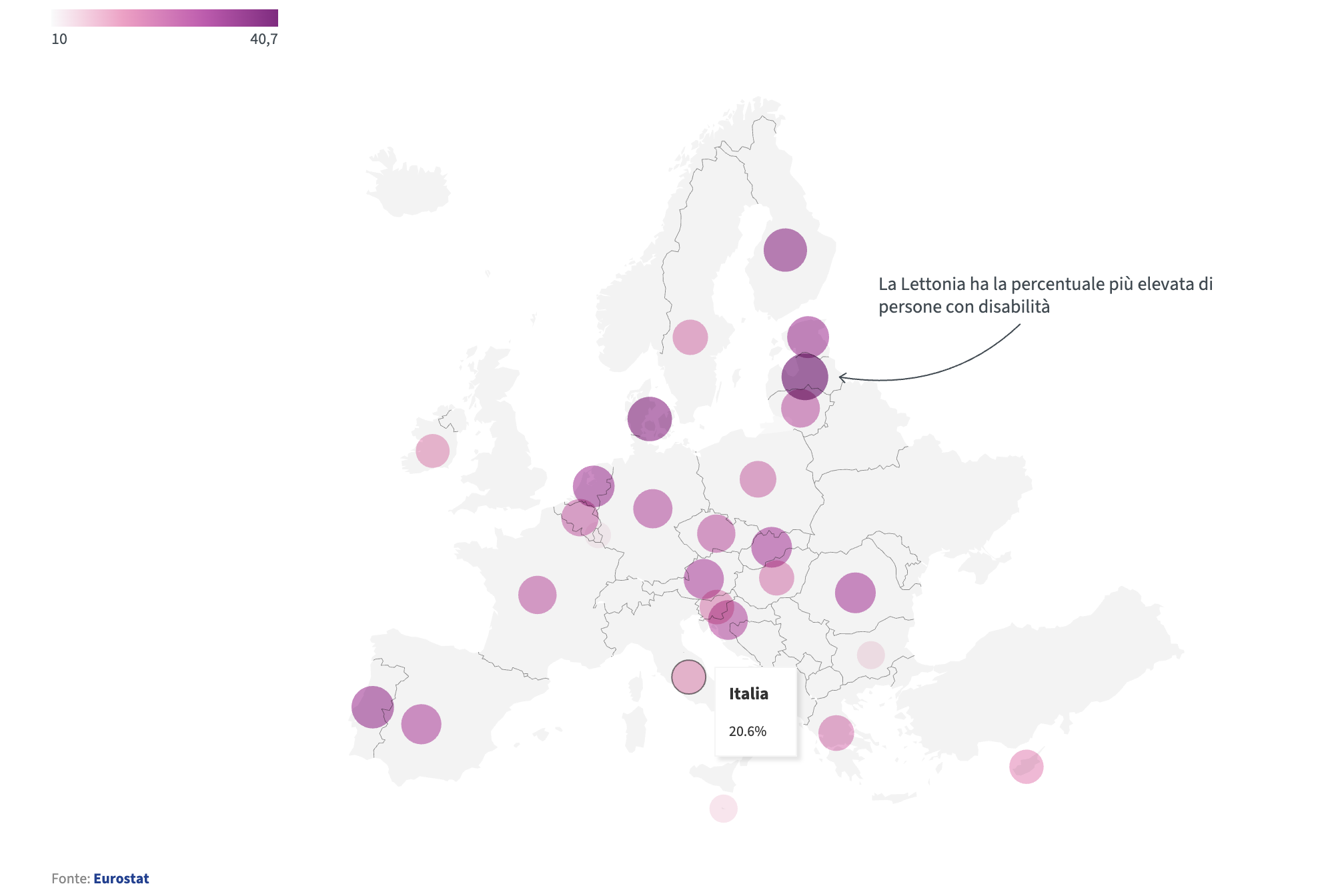
According to Eurostat data, one in four people in Europe aged over 16 lives with a disability. In Italy, the figure is one in five, slightly below the European average.
This statistic highlights that a significant share of the European population has daily needs related to physical, sensory, cognitive or mental disabilities.
But that is not all. Each of us, at least once in our lives, may find ourselves in a situation where an inaccessible website becomes an insurmountable barrier. Whether it is a temporary impairment, such as a broken arm, or a slow internet connection, accessibility is a topic that concerns everyone.
According to studies such as the “WebAIM Million”, over 95% of analysed home pages still contain errors that violate WCAG accessibility guidelines. This means that most of the web remains poorly accessible and that the share of sites truly compliant with international standards is still very low.
The practical point for businesses in 2026: when such a large portion of the web is non-compliant, the risk of discovering structural issues too late is high. Accessibility issues do not emerge only during audits; they surface when users cannot complete critical actions, when support requests increase, when conversions drop and when formal complaints are submitted.
One often underestimated element: today, compliance is not only enforced “top-down”. A report from a user, an association or a complaint linked to the inability to use a service can trigger remediation requests with tangible impacts on internal timelines and priorities.
WCAG, technical requirements and operational roadmap: how to comply without improvising
WCAG guidelines
European regulations are based on the Web Content Accessibility Guidelines (WCAG), which represent the international reference standard for ensuring accessibility.
The authoritative reference for the Web Content Accessibility Guidelines (WCAG) is maintained by the W3C and applies consistently across all EU member states.
From an operational perspective, WCAG are not “recommendations”: they are verifiable criteria. For a company this means one very concrete thing: it is not enough to “improve usability”, you must be able to demonstrate that the main service flows comply with measurable requirements such as full keyboard navigation, adequate contrast, correct alternative text, visible focus, explained form errors and a coherent semantic structure.
The Web Content Accessibility Guidelines (WCAG) are based on four fundamental principles that form the acronym POUR: Perceivable, Operable, Understandable, Robust. These principles are the foundation for designing and building web experiences that are usable by everyone, regardless of abilities or limitations.
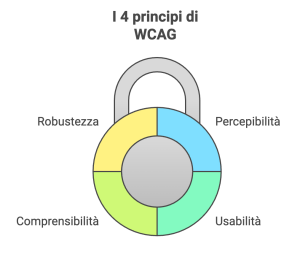
The POUR model is the basis for assessing whether a digital experience can be used by people with disabilities and with assistive technologies.
The perceivable principle focuses on the need for information to be presented in ways that can be perceived by any user, regardless of sensory abilities. A practical example is the use of alternative text that accurately describes images on the page, giving screen reader users a clear understanding of what is being represented. This criterion also includes providing transcripts for audio content, subtitles for videos, ensuring sufficient colour contrast between text and background (at least 4.5:1 for normal text), and allowing text to be resized up to 200% without loss of functionality.
When it comes to operability, the goal is to allow anyone to interact with content and navigate a website in a simple and intuitive way, regardless of device or physical abilities. Enabling form completion using only the keyboard is essential for users who cannot use a mouse. It is equally important to provide clear feedback when errors occur, such as missing required fields, and to avoid time limits that forcibly interrupt interactive functionality, allowing instead for extension or deactivation. Clear and descriptive labels for buttons and links also significantly improve navigation.
The understandability principle requires content and interfaces to be intuitive and consistent. Properly structuring a website’s navigation menu, for example, simplifies access to different sections for all users, especially when labels use clear and direct language. Overly technical or jargon-heavy text should be replaced with plain language or supported by clear explanations. Predictable component behaviour and precise instructions for complex tasks, such as entering a date in a specific format, further improve comprehension.
Robustness ensures that content can be correctly interpreted by multiple technologies, including screen readers and a wide range of browsers. A semantic HTML structure using appropriate tags such as header, nav, main, article and footer greatly facilitates interpretation by assistive technologies. Regular testing and keeping technical components up to date help maintain compatibility with the latest versions of assistive tools. In this context, it is essential to provide text alternatives for interactive charts or complex infographics so that no one is excluded from accessing information.
Applying these four principles consistently allows organisations to build web experiences that not only meet legal requirements, but also improve overall usability for a broader audience. Accessibility should therefore be seen not merely as compliance with standards, but as a design approach that places people at the centre, delivering tangible benefits for all users.
Pragmatic note: many accessibility issues are not “invisible defects”, but problems that directly impact conversion and customer support. Typical examples include forms that do not explain errors, buttons with generic labels, pop-ups that cannot be managed via keyboard, components that do not expose state correctly to screen readers, low contrast CTAs, missing focus indicators, informative images without alt text and incorrect heading hierarchies.
ARIA attributes: what they are and how to use them correctly
ARIA attributes (Accessible Rich Internet Applications) are used to communicate information about role, state and accessible name of interactive components to assistive technologies such as screen readers, especially when HTML alone is not sufficient (dynamic menus, modals, accordions, tabs or custom dropdowns).
However, ARIA is not a “universal patch”. If used incorrectly, it can worsen accessibility. The practical rule is: semantic HTML first, ARIA only where necessary.
Concrete examples (ready to use)
Example 1: link with non-descriptive text (accessible name via aria-label)
Learn more
Example 2: icon button (accessible name required)
Example 3: accessible modal (role, label, focus management)
Subscribe to the newsletter
Enter your email address to receive updates.
Example 4: accordion (aria-expanded and aria-controls)
Accordion content...
Example 5: form error message (aria-describedby and aria-invalid)
Please enter a valid email address.
These patterns are among the most useful for reducing real risks: forms, checkout flows, menus, modals and dynamic components are also the areas where reports and conversion blockers most frequently emerge.
How to make your website accessible (an operational plan, not just best practices)
Making a website accessible requires careful planning and a deep understanding of WCAG. However, there are some best practices that every company can adopt.
Writing alternative text for images: clearly and concisely describe the content of each image using meaningful ALT tags. Ensuring adequate colour contrast: use colour combinations that facilitate readability, including for users with visual impairments. Making the site keyboard-navigable: all interactive elements must be reachable and usable using only the keyboard. Using semantic headings: structure content with H1, H2, H3 tags to provide a logical information hierarchy. Simplifying forms: make contact and registration forms easy to complete, avoiding unnecessary fields and providing clear instructions.
The real step change comes from turning these best practices into a process. An isolated intervention rarely guarantees compliance: compliance is the outcome of audit, remediation, testing and governance.
Recommended roadmap (pragmatic)
An effective path, especially for e-commerce and high-complexity services, typically includes: 1) analysis of critical flows (search, product page, cart, checkout, login and registration, forms, personal areas), 2) technical and content audit with evidence, 3) prioritised remediation plan, 4) keyboard and assistive technology testing, 5) controlled release and regression prevention. This approach avoids two common mistakes: spending inefficiently and becoming non-compliant again within a few months.
How to avoid falling out of compliance after each update
In 2025, many companies have already implemented “spot” fixes, but struggle because accessibility breaks with new landing pages, theme updates, plugins, sliders, pop-ups, third-party tools, tag managers and marketing components. This is why a simple rule is needed: every new feature must pass a basic accessibility check before going live.
Publishing the accessibility statement
The obligation to publish an accessibility statement applies to all public and private entities that provide digital services to the public via websites or apps. The Italian “Legge Stanca” already imposed this obligation on private entities with an average turnover exceeding 500 million euros over the last three years and on public administrations. With the EAA, the scope has been significantly expanded, extending the obligation to a wider range of sectors including banking, transport, telecommunications and e-commerce. For newly included entities, the accessibility statement must be published by 23 September each year and must follow AgID guidelines. For this and much more, the dedicated portal https://accessibilita.agid.gov.it/ was launched in October, providing documentation and tools for developers and accessibility managers.
At EU level, the accessibility obligations introduced by the EAA are part of a broader regulatory framework coordinated by the European Commission and implemented locally by national authorities.
Fundamental operational note: the statement is not a “formal checkbox”. If you declare compliance and a user demonstrates the opposite on a critical flow such as checkout, the organisation is exposed to greater risk. The statement must reflect audit results, the real state of the service and any remediation plan in place.
From a UX and business perspective, the accessibility statement is also a signal: it communicates attention, accountability and a feedback channel. When managed properly, it reduces conflict and builds trust.
Risks, sanctions, exemptions, benefits and tools: completing compliance in a sustainable way
Business benefits of being accessible
Investing in accessibility means not only complying with the law, but also opening the door to a broader market. People with disabilities represent a significant portion of the population, and many of them have substantial purchasing power. Moreover, an accessible website is easier for search engines to index, improving online visibility and attracting more visitors.
For e-commerce businesses, accessibility is not merely a regulatory requirement but a real growth and differentiation lever. Making a site usable by everyone has a direct impact on business metrics and helps strengthen brand image by conveying inclusion and care for all users. Studies by Forrester show that companies investing in these strategies achieve significant increases in engagement, while Gartner reports consistent traffic growth for organisations that adopt accessibility practices, which are rewarded by search engines and high-quality referrals.
These are not just percentages, but indicators of a growing trend. A well-designed interface reaches audience segments that are traditionally excluded or penalised, such as people with visual, hearing or motor impairments, while also improving the experience for everyone by simplifying overall usability. This focus on ease of navigation often leads to higher conversion rates and reduced customer support costs thanks to more intuitive processes.
But the benefits of accessibility go beyond economics. A company that commits to making its products and services accessible demonstrates strong social responsibility, strengthening its reputation and increasing customer loyalty.
In summary:
- Market expansion: Reach a wider audience, including people with disabilities who represent a significant market segment.
- Improved SEO: Search engines reward accessible websites, increasing online visibility.
- Increased trust: Demonstrate commitment to inclusion and social responsibility, strengthening reputation.
- Higher customer satisfaction: Offer a better user experience for everyone, increasing loyalty and reducing bounce rates.
Additional value (often overlooked): accessibility and data quality reinforce each other. Accessible forms reduce input errors, improve conversion rates, lower drop-off and make insights more reliable across analytics, funnels and customer journeys. In other words, accessibility is also a performance accelerator when correctly integrated into UX and UI.
Sanctions
Responsibility for verifying violations and applying sanctions is divided between AgID (Agency for Digital Italy) for services and websites, and the Ministry of Economic Development, pursuant to Article 18 of the decree, for products.
The regulation establishes different types of sanctions, which may be administrative and financial and vary depending on the severity of the infringement and the size of the company. Supervisory authorities may also order the withdrawal of non-compliant products from the market or prohibit their sale, and for websites may order their shutdown in addition to the relevant fine.
The Italian “Legge Stanca” and its amendments had already introduced financial penalties which, for companies with an average turnover exceeding 500 million euros, may reach up to 5% of annual turnover. These are complemented by Article 24 of Legislative Decree 82/2022, which allows sanctions to be graded based on the severity of the violation and company size, and provides for the withdrawal of non-compliant products from the market.
The decree further specifies that violations of accessibility requirements under Articles 3, 6 (paragraphs 1–8), 8 (paragraphs 1–7), 9 (paragraphs 1–4), 10 and 12 (paragraphs 1–4) may result in sanctions ranging from €5,000 to €40,000, determined according to the seriousness of the violation, the number of affected products or services and the number of people involved. A sanction between €2,500 and €30,000 applies to those who fail to comply with supervisory authority orders, while unjustified non-cooperation with authorities may also result in fines between €2,500 and €30,000.
Operational interpretation for companies in 2026: the risk is not only financial. The most expensive consequences are often indirect: service disruptions, unplanned development work, delayed roadmaps, reactive fixes on checkout or critical areas, increased customer support tickets and reputational damage. This is why a structured audit and governed remediation are preferable to rushed fixes after a formal complaint.
Exemptions from accessibility statement obligations
The European Accessibility Act (EAA) has a broad scope aimed at ensuring accessibility of products and services for people with disabilities. However, there are some specific exclusions and exemptions.
Below are the main services and products that do not fall directly within the scope of the EAA:
1. Micro-enterprises for services: This is the most relevant exemption for private companies. Micro-enterprises are excluded from EAA obligations for services (not for the products they sell). A micro-enterprise is defined as an organisation that has fewer than 10 employees and an annual turnover or balance sheet total not exceeding 2 million euros.
It is important to note that even for micro-enterprises, accessibility is strongly encouraged, as it benefits all users and can have positive reputational effects. Moreover, in practice many micro-enterprises rely on third-party platforms and tools: if these components are inaccessible, user experience risks remain even where legal exemptions apply.
2. Business-to-Business (B2B) services: The EAA primarily targets services aimed at consumers (B2C). Services provided exclusively between businesses generally fall outside the scope, unless they are also offered to self-employed workers, small businesses or via public platforms.
3. Specific website and mobile app content: Legislative Decree 82/2022 lists certain exclusions related to specific content types.
- Pre-recorded time-based media published before 28 June 2025: videos or audio content published before this date do not need to be retroactively made accessible.
- Office file formats published before 28 June 2025: existing files are not subject to retroactive accessibility requirements.
- Maps and online cartography services: the map itself may have exceptions, but essential navigation information must be accessible.
- Third-party content: content not funded, developed or controlled by the service provider may be excluded, though many third-party components are in practice integrated and manageable.
- Content not updated after 28 June 2025: possible exemption under specific conditions.
4. Services not listed among those covered by the EAA: If a service is not included among the specified categories, it may fall outside the directive. Covered categories include electronic communications, audiovisual media services, passenger transport, consumer banking services, e-commerce, e-books, dedicated software and emergency communications to 112.
5. Disproportionate burden exemption: Even when a product or service falls within scope, an economic operator may be exempt from specific accessibility requirements if compliance would impose a disproportionate burden. This must be rigorously documented and justified, considering costs, benefits, available resources and the nature of the service.
Pragmatic note: “disproportionate burden” is not an easy way out. In 2026 the trend is toward requiring very solid and well-documented justification. For e-commerce and core digital services, critical areas such as forms, login and checkout are typically the first to be scrutinised in case of complaints, making proactive intervention advisable.
The future of web accessibility
Web accessibility is a constantly evolving field. With the rise of artificial intelligence and new technologies, new opportunities are emerging to create even more inclusive user experiences. Voice assistants and virtual reality, for example, are changing how people interact with the web, and accessibility must be integrated from the earliest stages of development. With the entry into force of the European Accessibility Act, Europe has established a clear baseline that all new technologies must align with, while also benefiting from clearer and more accessible content structures.
In 2026, the direction is clear: accessibility, content quality and information architecture become enabling factors for search engines and AI-based systems as well. Structured, navigable and semantically clear content is easier to interpret, reuse and reference.
What we can do for you
Web accessibility is no longer optional, but a requirement for an inclusive digital future. Investing in accessibility means building a world where everyone can actively participate online. It benefits people with disabilities, businesses and society as a whole. However, it also increases complexity in designing websites and e-commerce platforms. Alongside UX and UI design, accessibility planning and ongoing maintenance through annual accessibility statements are now essential. This is a new challenge where ethical responsibility meets concrete business opportunities, enabling fairer access to information for all. It should also be remembered that accessible content is easier for search engines and generative AI systems to interpret.
We have 25 years of experience and have lived through the entire evolution of the web from its early days to today. For this reason, we can help you make your website compliant with regulations and ethical standards, prepare your accessibility statement, provide an audit and improvement report for your digital service, and help you achieve tangible business benefits.
Consultative approach (pragmatic first step): the first step is not “redo everything”. The first step is understanding whether you are compliant today, where gaps exist and which priorities matter most from both legal and business perspectives. From there, we build a roadmap that integrates UX, development, content, third-party components and governance, with testing and regression prevention.
A simple rule of thumb: start with the flows that carry the highest value and risk (contact forms, login, checkout, payments, bookings). That is where accessibility becomes immediately measurable.
Frequently asked questions about the European Accessibility Act (FAQ)
Below you will find answers to the most common questions about the application of the European Accessibility Act for businesses, e-commerce and digital services. The FAQs are structured for simple, accessible and compliant consultation.
Does the EAA also apply to websites that are already online?
Yes. The European Accessibility Act is already fully in force. The obligation does not apply only to new websites or new platforms, but to all active digital services that fall within the scope of the regulation.
If a website, an e-commerce platform or an application is online and used by users in the European market, it must meet the accessibility requirements, regardless of the year it was published.
Is publishing the accessibility statement enough?
No. The accessibility statement is not just a formal requirement. It must reflect the real conformance status of the website or application.
Declaring compliance when the main flows (forms, login, checkout, payments, bookings) are not actually accessible exposes the organisation to higher risks in the event of reports or checks.
The statement should be supported by audits, technical evidence and, where necessary, a clear remediation plan.
Are micro-enterprises always excluded from the EAA?
No. The exemption for micro-enterprises applies only to certain types of services and is subject to specific requirements, such as number of employees and annual turnover.
Moreover, even where an exemption applies legally, accessibility remains a best practice that improves user experience, reduces operational issues and can positively affect conversions and reputation.
Do ARIA attributes solve accessibility issues?
No. ARIA attributes are a supporting tool, but they do not replace correct HTML structure, keyboard navigation, adequate contrast, focus management and clear error messaging.
ARIA should be used only when necessary, especially for dynamic or custom components. Incorrect or excessive use can even worsen the experience for users of assistive technologies.
Where is the best place to start to comply sustainably?
The right starting point is an accessibility audit of the flows that generate value and risk: contact forms, login, registration, checkout, payments and restricted areas.
From there, you build a roadmap with clear priorities, avoiding spot fixes and preventing regressions with every site update or new feature release.
Regulatory references and useful links
Eurostat – Disability dataset
Dataset on disability levels in Europe.
European Council – Disability infographics
Facts and figures on disability in the European Union.
European Commission – European Accessibility Act
Official overview of the EAA and its objectives.
W3C – WCAG Guidelines
Web Content Accessibility Guidelines official recommendation.
W3C – WCAG 2.1 Italian translation
Official Italian translation of WCAG 2.1.
AgID – Italian accessibility regulations
National accessibility framework and legal requirements.
AgID – Accessibility portal
Guidelines and tools for digital accessibility in Italy.
AgID – Accessibility self-assessment model
Official PDF model for accessibility self-evaluation.
Continua a leggere
12 minutes of reading
12 minutes of reading

6 minutes of reading

And it consumes less energy.
To return to the page you were visiting, simply click or scroll.